

Storage is one of those parts of a homelab that can quietly become critical without you really noticing it happening.
At first, a NAS is somewhere to put files.
Then a Raspberry Pi starts using it for backups. Docker applications start storing persistent data there. Windows machines use shared folders. Proxmox needs network storage. Project files move onto it. Website data depends on it.
Eventually, changing anything on the NAS affects half the lab.
That is exactly what happened in Realm Labs.
The main storage system is a Synology DS224+ named Seido, and it has gradually become the central storage layer connecting virtualisation, containers, Windows systems, Raspberry Pis and self-hosted applications.
This is how that storage environment is put together, what depends on it, and what I have learned from running it.
The Synology DS224+
The main Realm Labs NAS is a Synology DS224+.
On the network it is known as:
SeidoGiving infrastructure proper hostnames has become increasingly important as Realm Labs has grown.
It is much easier to work with:
\\seido\Softwarethan to build applications and scripts around an IP address that may eventually change.
The NAS currently provides storage for:
- Windows network shares
- Linux systems
- Raspberry Pi projects
- Docker application data
- project files
- website data
- system backups
- shared resources
- Proxmox-related storage
It is therefore no longer just a file server.
It is infrastructure.
Why Centralise Storage?
Before centralising data, it is very easy for a homelab to end up looking like this:
Windows PC
   |
Local files

Raspberry Pi
   |
SD card

Docker host
   |
Local volumes

Server
   |
Local storage
Each system works independently, but important data becomes scattered across multiple machines.
Realm Labs now works much more like the architecture below, with Seido acting as a shared data layer rather than every system keeping its important files locally.
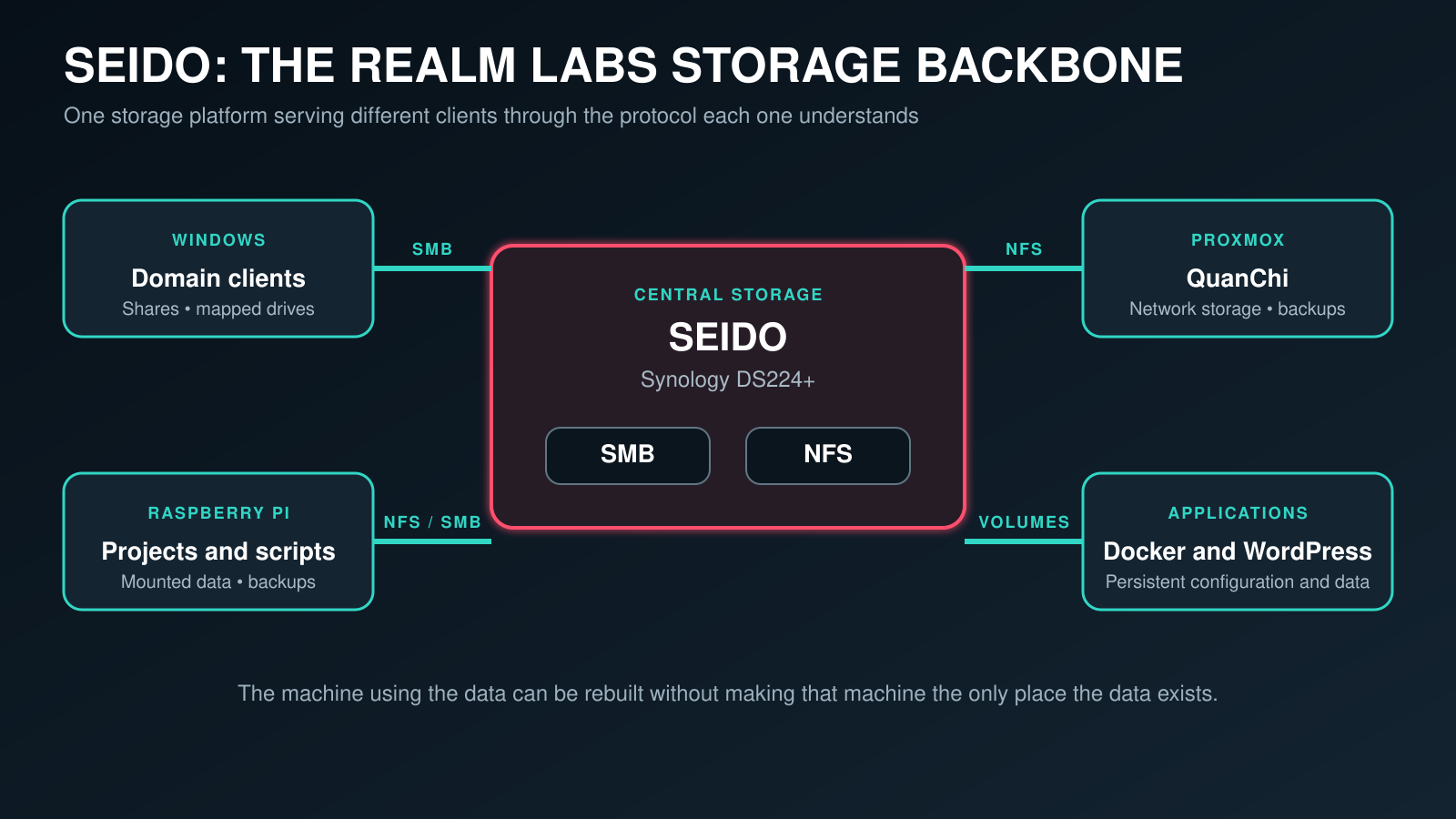
| Consumer | Access method | What belongs on Seido |
|---|---|---|
| Windows domain clients | SMB | Shared resources, mapped drives and project files |
| Proxmox / Linux | NFS | Network storage, backups and shared application data |
| Raspberry Pi systems | NFS or SMB | Projects, scripts, configuration and backup copies |
| Docker services | Persistent volumes | Databases, configuration and application state |
| WordPress | Persistent storage | Uploads, database data and site configuration |
The advantage is not simply having more storage.
The important part is separating data from the machine currently using it.
Separating Compute from Storage
This has become one of the main design principles of Realm Labs.
Proxmox provides compute.
Synology provides storage.
Docker provides applications.
The data should not depend entirely on any one of them continuing to exist.
Conceptually, the operating environment is replaceable while the persistent layer is protected from routine rebuilds and upgrades:
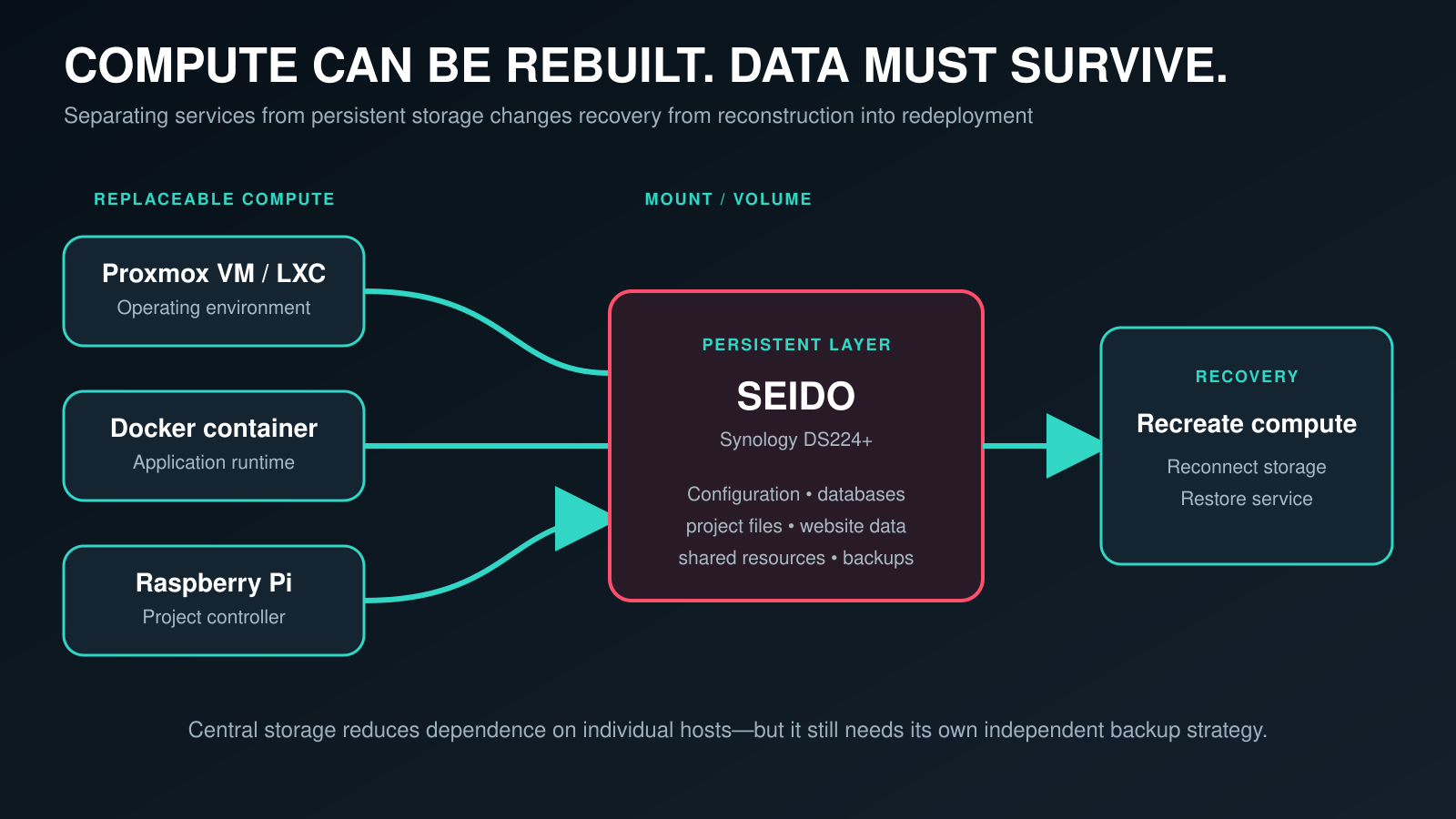
A virtual machine can be rebuilt.
A Docker container can be recreated.
A Raspberry Pi can be replaced.
Replacing the data stored inside those systems is considerably harder.
Synology and Proxmox
One of the most useful relationships in the lab is between Seido and the Proxmox environment. The compute side is covered separately in Proxmox VE: The Infrastructure Foundation for Realm Labs. For a broader look at shared storage choices, NFS setup and how Proxmox can consume network storage, RackNotes also has a useful Proxmox shared storage guide.
Proxmox handles virtualisation while the Synology provides storage independently of the hypervisor. That separation also matters when infrastructure changes: I documented the process for changing a Proxmox NFS server IP when pvesm set refuses the fixed server parameter.
The basic arrangement is:
+--------------------+
|    Synology NAS    |
|       Seido        |
+---------+----------+
          |
          | Network Storage
          |
+---------v----------+
|      Proxmox       |
|      QuanChi       |
+--------------------+
This separation has proved useful because a problem with the compute host does not automatically mean the storage platform has disappeared as well.
It also makes troubleshooting easier.
If compute looks unhealthy, I investigate Proxmox.
If storage looks unhealthy, I investigate Synology.
If both look healthy, the network is normally the next suspect.
NFS for Linux and Proxmox
NFS provides network storage to Linux-based systems.
In Realm Labs it has been useful for:
- Proxmox
- Linux hosts
- Raspberry Pi systems
- shared project folders
- persistent application data
The important point is that a Linux workload does not have to keep everything important on its own local disk.
A Raspberry Pi SD card can fail without taking the only copy of a project with it.
Likewise, a service can be rebuilt while the data it relies on remains somewhere else. In practice, the protocol details still matter: my guide to a Synology NFS share that only mounted with NFSv3 shows how a small version mismatch can look like a much larger storage failure.
SMB for Windows
The same Synology also provides SMB shares for Windows.
Windows clients can therefore access resources using familiar UNC paths such as:
\\seido\ShareNameSome shares are also mapped to drive letters on Windows systems.
For example:
S:  Software
X:  Demo
This becomes particularly useful alongside the Realm Labs Windows domain because access to shared resources can be managed centrally rather than configured manually on every PC.
One Storage Platform, Different Clients
Using both SMB and NFS means the same NAS can serve different parts of the environment without pretending that Windows and Linux clients have identical requirements.
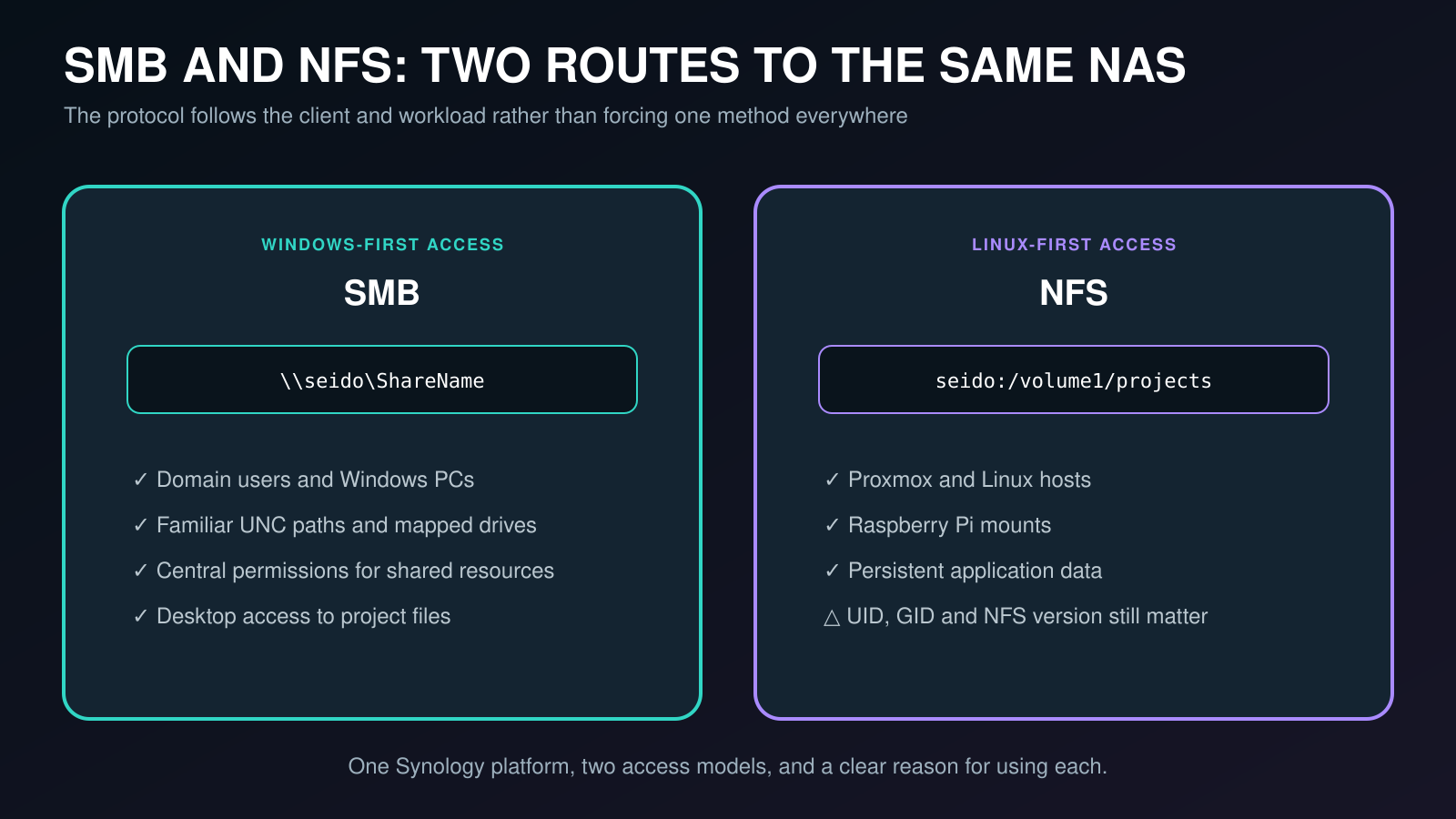
That is one of the reasons the NAS has become such a central component.
Almost every type of system in the lab can use it.
Docker Persistent Data
Docker containers are deliberately disposable.
Application data is not.
That distinction has influenced how I structure self-hosted services. It also explains why correct ownership matters so much; fixing Docker permissions on a Synology NFS share required aligning the container’s UID and GID with the storage it was trying to use.
A container might be deleted and recreated during an upgrade:
Stop
  |
Delete
  |
Pull new image
  |
Recreate
Provided the important data lives outside the container, the service can come back with its configuration intact.
The general approach is:
Docker Container
       |
       v
Persistent Data
       |
       v
Central Storage
This is used for services such as:
- WordPress
- databases
- monitoring applications
- MQTT
- dashboards
- configuration data
- other self-hosted services
It makes containers much less precious.
Realm Labs Itself Depends on the Storage Layer
The website documenting Realm Labs is itself part of Realm Labs.
WordPress runs in the self-hosted environment and is published externally using Cloudflare Tunnel. The complete arrangement is documented in Self-Hosting RealmLabs: Running WordPress from My Home Lab.
At a high level:
Internet
   |
Cloudflare
   |
Cloudflare Tunnel
   |
Docker
   |
WordPress
   |
Persistent Data
   |
Realm Labs Storage
I rather like that.
The site describing the homelab actually depends on the infrastructure it documents.
Raspberry Pi Projects
Central storage is also useful away from the traditional server side of the lab.
Raspberry Pi systems can use the NAS for:
- backups
- project files
- scripts
- shared resources
- persistent data
One useful workflow is editing files from a normal desktop rather than directly on the Pi:
Desktop PC
    |
Edit Project
    |
Synology NAS
    |
Mounted Share
    |
Raspberry Pi
    |
Hardware / Automation
That is particularly handy for Pi-based projects that normally run unattended.
Backing Up Raspberry Pis
Some Raspberry Pis perform very specific jobs around Realm Labs.
Rebuilding Raspberry Pi OS is easy.
Recreating years of scripts and configuration is not.
Backing those systems up to the NAS gives me somewhere central from which they can be recovered if an SD card or device fails.
That is another example of the same principle:
Hardware is replaceable.

Configuration should be recoverable.
The Static IP Lesson
One of the better examples of how important Seido had become was when I changed its static IP address. The detailed troubleshooting is recorded in Moving a Synology NAS to a New Static IP.
Changing the address on the NAS itself was straightforward.
Finding everything else that still referenced the old IP was not.
Over time the address had made its way into:
- DNS configuration
- NFS mounts
- Raspberry Pi configuration
- application settings
- storage mappings
- scripts
- other infrastructure
The NAS worked perfectly at its new address, yet seemingly unrelated systems started behaving strangely.
That taught me a useful lesson:
Infrastructure dependencies are often invisible
until you change the infrastructure.
It also reinforced why I prefer using hostnames wherever possible.
Use Hostnames Where Possible
Hard-coded IP addresses are quick and convenient.
They also accumulate.
A configuration containing:
192.168.x.xworks perfectly until that address changes.
Using:
seidoor the appropriate internal DNS name removes that dependency from many configurations.
There will always be situations where IP addresses are required, but reducing unnecessary hard-coded addresses makes future network changes considerably easier.
Active Directory and Shared Storage
The Synology also supports the Windows side of Realm Labs, including the order.realm Active Directory environment.
Domain-joined Windows systems need access to shared resources, and the NAS provides the storage behind a number of those resources.
This gives me somewhere to experiment with:
- mapped drives
- permissions
- Group Policy
- central file access
- domain users
- Windows administration
It is another example of how storage and identity gradually become interconnected as a lab becomes more sophisticated.
RAID Is Not a Backup
This is worth stating clearly.
RAID != BackupThe NAS uses redundant storage so a single drive failure does not immediately mean the storage environment disappears.
That is useful for availability.
It does not protect against everything else that can destroy data.
For example:
Disk failure
     |
Redundancy may help


Accidental deletion
Corruption
Malware
NAS failure
     |
Backup matters
That distinction becomes more important as more systems depend on the NAS.
The Current Backup Approach
Important Synology data is also backed up separately.
An external 4 TB USB drive is used with Synology Hyper Backup, with scheduled backups of the important shared folders and application data.
Version rotation is enabled so the backup is not simply another single copy of the current state.
This provides protection beyond the disks inside the NAS itself.
It is deliberately separate from RAID because the two solve different problems.
What Actually Needs Backing Up?
Not everything has equal value.
A downloaded Docker image can be downloaded again.
A Windows installation can be recreated.
A container can be redeployed.
The things I care about most are:
- personal data
- project files
- configuration
- databases
- scripts
- website data
- application data
- backup sets
- anything difficult or impossible to recreate
That distinction helps keep the backup strategy focused on recovery rather than simply copying absolutely everything.
Monitoring the NAS
Once a storage system becomes this important, I do not want its health to be invisible.
Realm Labs monitoring includes visibility of infrastructure metrics through tools such as Prometheus, Grafana and Home Assistant.
For storage, useful things to watch include:
- disk usage
- available capacity
- system health
- memory usage
- temperature
- network availability
- throughput
- capacity trends
Seeing storage gradually filling up is much nicer than finding out because an application suddenly stops writing data.
The Network Matters Too
A central NAS is only as reliable as the network connecting everything to it.
Storage performance therefore depends on more than the disks.
It also relies on:
- Ethernet links
- switches
- DNS
- addressing
- permissions
- routing
- network configuration
A storage problem can sometimes turn out to have nothing wrong with the storage at all.
This is why networking and storage have become closely related parts of the Realm Labs environment.
The Downside of Centralisation
Centralising storage solves one problem but creates another.
If each device keeps its own data, the failure of one device generally affects only that device.
When multiple systems rely on one NAS, losing the NAS can affect a large part of the environment at once.
That means Seido needs to be treated accordingly.
Important areas include:
- reliable storage
- disk redundancy
- backups
- monitoring
- documented configuration
- reliable networking
The more systems depend on something, the less casually it can be treated.
What I Would Change
The DS224+ has performed well for Realm Labs, but its biggest limitation is straightforward: it only has two drive bays.
That is currently enough for the environment, but it limits future storage expansion and the RAID layouts available.
If storage requirements continue to grow, moving to a four-bay or larger Synology would be the obvious next step.
I would not replace the DS224+ simply for the sake of upgrading, though.
At the moment it continues to do exactly what I need it to do.
What I Have Learned
The biggest lesson is that storage can quietly become infrastructure.
A few things have become particularly clear.
Keep data separate from compute
Applications and machines can be rebuilt much more easily when their important data lives somewhere independent.
Use hostnames instead of hard-coded IPs
Eventually, that IP address will change.
Centralise where it makes sense
Central storage simplifies administration, sharing and backups.
Know what depends on what
A seemingly minor infrastructure change can affect systems you had forgotten were connected to it.
Monitor capacity
Storage rarely becomes full instantly. Being able to see the trend gives you time to deal with it.
RAID is still not a backup
That one deserves repeating.
The Storage Backbone of Realm Labs
The Synology NAS is not the flashiest project in Realm Labs.
It does not have moving lights.
It does not make TARDIS noises.
Most of the time, it just sits there doing its job.
But Proxmox, Docker applications, Windows clients, Raspberry Pi systems, backups and project data all interact with it in one way or another.
That is what makes Seido the storage backbone of Realm Labs.
It started as somewhere to keep files.
It ended up becoming part of the infrastructure everything else is built around.