


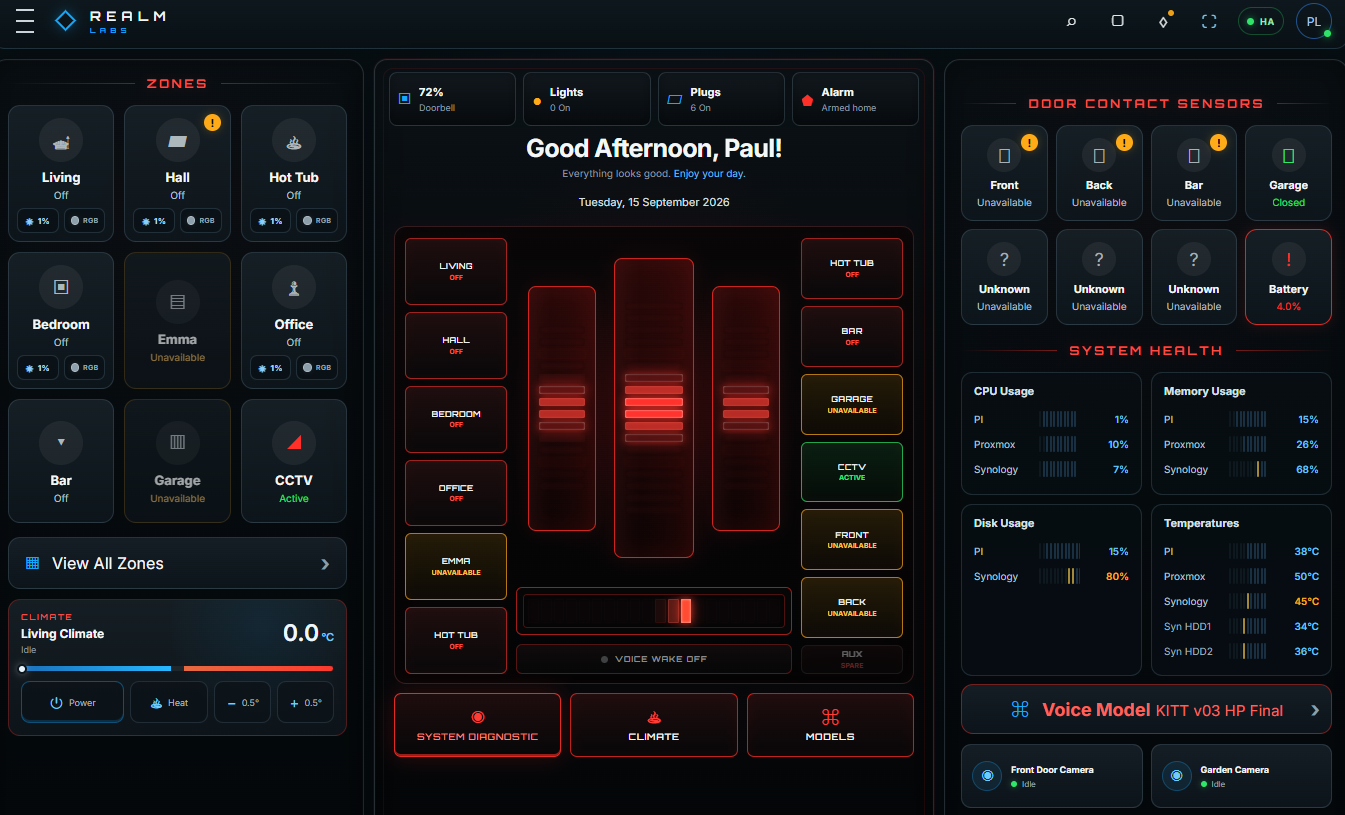
This project started as a control-centre dashboard and gradually became my own KITT-inspired interpretation of the idea: a voice-reactive smart-home panel with Home Assistant controls, a custom Piper voice, wake-word activation, multi-turn conversation and a local AI fallback.
Project note: KITT and Knight Rider are referenced here as inspiration for an unofficial fan-built technical project. Realm Labs is not affiliated with or endorsed by the rights holders; the dashboard, integrations and code described here are my own project work.
Home Assistant is still the anchor for the whole thing. It is excellent at device integration, state management and automation, and I had no interest in replacing the part it already does well. What I wanted to replace was the feel of the interface. Rather than another Lovelace-style dashboard, I wanted something that looked and behaved like my own control centre: KITT-inspired, voice-led, compact enough for a tablet, useful on desktop and completely tailored to the way I use the house and home lab.
That separation became an important design rule throughout the build: Home Assistant remains the automation engine; my dashboard becomes the experience layer.
Where this fits with the earlier KARR and KITT projects
This build combines work from Building KARR: A Local AI Assistant with Ollama, WebSockets, Memory and a Custom Web Interface, Training a Custom KARR Voice with Piper TTS, WSL and a GTX 1080 Ti, Building a Mobile MQTT Control Panel for My Home Lab Models and my Home Assistant wall-tablet control panel.
The architecture
Browser dashboard → deterministic Home Assistant commands → Piper TTS → KITT/KARR voice → local AI fallback for unmatched conversationThe house-control layer remains deterministic. The AI can talk, reason and comment on live dashboard context, but it does not get unrestricted Home Assistant control.
Designing the KITT control centre
The biggest visual change was turning the centre of the dashboard into a proper KITT-inspired console: three red voice banks, a scanner, ten side buttons for quick zone controls and three primary actions beneath it: Diagnostic, Climate and Models. Mobile and desktop use the same design language while keeping the existing monitoring panels useful.
Mapping the dashboard to speech
Every meaningful dashboard control was mapped to spoken commands before AI was added. Examples include:
Turn the living room on
Turn the bar off
Set the office brightness to 40 percent
Make the living room blue
Set the heating to 21 degrees
Run a system diagnostic
Switch to KARR
How many lights are on?
Aliases such as lounge, front room and living room resolve to the same Home Assistant control.
The dedicated Piper TTS server
Piper runs in its own lightweight Linux container and exposes a FastAPI/Uvicorn HTTP service on port 5000. The dashboard talks to a PHP proxy on Seido, which forwards requests to the TTS server. The service provides health checks, model selection and speech generation.
GET /health
GET /model
POST /model
POST /tts
KITT and KARR are custom Piper ONNX voices. Training was completed separately on RACING-RIG with WSL and a GTX 1080 Ti, while the deployed TTS container only needs Piper and the exported models.
Making speech feel immediate
Cold synthesis was the main cause of delay. Once a phrase had been spoken it was effectively instant from cache, so I added a controlled warm-up queue that pre-generates common phrases in the background. Only one background warm-up runs at a time so live speech still has priority.
The voice bars now begin animating when audio actually starts, rather than while the browser is waiting for synthesis.
HTTPS without making the dashboard public
Reliable browser microphone access required HTTPS. I used Cloudflare Tunnel plus Cloudflare Access so the KITT panel has a secure origin but remains protected behind my own authenticated Google account. No router port-forward is required.
“Hey KITT” wake-word flow
The first voice-input version uses the browser speech-recognition engine. It waits for “Hey KITT”, plays the acknowledgement beep, wakes the scanner and gives a random acknowledgement such as “Yes, Paul?” before entering command-listening mode.
Hey KITT → acknowledgement → listen for command → process → reply → listen againMulti-turn conversation
Once KITT is awake I do not need to repeat the wake phrase. After every reply the system listens again. Fifteen seconds of genuine silence ends the session, KITT chooses a random sign-off such as “Catch you in a bit, Paul”, and the dashboard returns to wake-word standby.
The timer is paused while KITT is thinking so a slow local-AI response cannot cause him to sign off before his own answer arrives.
Adding local AI without giving it control
Known commands are handled by the local rule layer. Only unmatched conversation goes to the language model:
Speech → known command? → yes: Home Assistant action | no: local AI → Piper replyThis is the safety boundary I wanted from the start: AI can be conversational without being allowed to invent hardware actions.
KITT-AI as a separate Proxmox LXC
I created a second Debian LXC for the conversational layer rather than burdening the TTS container. Ollama runs a quantised Qwen 2.5 3B model, then a custom kitt-ai model is built from a Modelfile containing the personality and response rules.
ollama pull qwen2.5:3b
ollama create kitt-ai -f Modelfile
ollama run kitt-ai
The prompt was tuned to remove generic chatbot habits such as “How can I assist you?” and keep replies concise, calm and dryly KITT-like.
Live dashboard context
The Android control centre now also displays live KITT-AI CPU, RAM, swap and disk health through Prometheus. For CPU, RAM and disk I use Proxmox-side LXC accounting so the values agree with the Proxmox UI, while node_exporter supplies guest-side metrics such as swap. The complete monitoring path is documented in Monitoring Proxmox LXC Containers Accurately with Prometheus and PVE Exporter.
Each AI request can include a compact snapshot of the current dashboard state: light and plug summaries, alarm state, voice model, climate readings, zone states and Pi/Proxmox/Synology health metrics. That lets KITT answer questions such as “How are the systems looking?” from real local data instead of inventing a response.
Hardware used
The relevant equipment is also listed on my Hardware page.
| Hardware | Role |
|---|---|
| Synology DS224+ (Seido) | Hosts the dashboard/web side. View current equivalent on Amazon. |
| Shuttle DS81 (QuanChi) | Proxmox host for the TTS and KITT-AI LXCs. View current mini-PC equivalent. |
| NVIDIA GTX 1080 Ti | Used for Piper voice training and earlier local-AI experiments. |
| TP-Link Deco X55 | Main LAN/Wi-Fi platform. View on Amazon. |
| HP ProCurve 2810G-24 | Part of the wired network backbone. View current equivalent. |
From KARR voice experiments to a usable KITT voice stack
The voice work evolved through several stages rather than arriving fully formed. KARR was my first custom Piper training experiment and proved the end-to-end path from curated audio, through WSL/GPU training, to an exported ONNX model. KITT followed with a larger, more carefully selected William Daniels dataset and several training checkpoints before I settled on the versions that sounded best in the dashboard.
That also led to one of the more useful features in the control centre: live voice-model switching. KITT and KARR can share the same TTS service, while the dashboard changes the active symlink/model and clears the relevant cache so I can compare voices without rebuilding the server.
Why the TTS and AI services live in separate LXCs
I deliberately split speech and language-model workloads. The TTS LXC stays small and predictable, handling Piper synthesis and model management, while a separate Debian LXC runs Ollama and the kitt-ai model. That means an AI model load, restart or tuning change does not take the voice service down with it.
Dashboard / Seido
├── Home Assistant + monitoring proxies
├── TTSServer LXC → Piper / KITT / KARR
└── KITT-AI LXC → Ollama / kitt-ai
Fixing the browser speech-recognition edge cases
The wake-word prototype exposed a few browser quirks. One early version chose the longest speech-recognition alternative rather than the highest-confidence result, which made perfectly good commands look unreliable. Switching to the browser’s best-ranked alternative immediately improved recognition.
The other important change was separating wake mode from conversation mode. Once KITT answers the wake phrase, the recognition loop stays active for follow-up commands until the hard conversation deadline expires. Browser no-speech events are allowed to restart recognition, but they no longer reset that deadline indefinitely.
Handling local-AI latency properly
Running a 3B model on older CPU hardware is perfectly usable for this project, but it is not instant. Initially the 15-second conversation timer could expire while Ollama was still generating a reply, so KITT would start a sign-off before his own answer had arrived.
The fix was simple but important: pause the human-silence timer while AI is thinking, speak the completed answer, then start a fresh 15-second listening window. The result feels like a conversation rather than two independent timers fighting each other.
Why the AI is a fallback rather than the control layer
This became one of the strongest architectural decisions in the project. Fast, known commands such as lights, brightness, colour, climate and diagnostics never need a language model. They are parsed locally and mapped to known entities and services. Ollama only sees conversation that does not match those deterministic controls.
That improves speed and reliability, but more importantly it stops a generative model from becoming the authority for household actions. KITT can discuss what he sees in the live context, but the dashboard still owns the actual control logic.
Reliability and watchdogs
A useful fault appeared when the TTS service remained healthy inside its LXC but became unreachable from Seido. Restarting the LXC restored connectivity. That has led to the next small improvement: a watchdog that checks the TTS health endpoint and only restarts the container after several consecutive failures.
Sharing the code
I am happy to share the complete dashboard code. The public bundle removes Home Assistant tokens, passwords, private entity IDs and infrastructure-specific addresses. It includes the dashboard PHP/HTML, CSS, JavaScript, TTS and AI proxy examples, the Piper HTTP wrapper and the Ollama Modelfile. Trained voice-model files and original source recordings are not included.
Download: public source bundle link will be added once the ZIP is uploaded to Realm Labs.
What comes next
The next improvements are better local speech recognition, a dedicated wake-word engine, a self-healing TTS watchdog and continued KITT personality tuning from real conversations. The core architecture is now in place: Home Assistant controls the house, Piper provides the voice and the local model supplies conversational intelligence.