
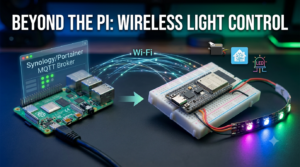

A Raspberry Pi is excellent for Home Assistant, Node-RED and other central automation services, but it is excessive when the job at the far end of the network is simply switching an LED, relay or model light. That is where the ESP32-C3 fits neatly into my lab.
The ESP32-C3 is a small RISC-V microcontroller with Wi-Fi and Bluetooth. I use it as a wireless endpoint: the Synology NAS runs the MQTT broker, Node-RED or Home Assistant decides what should happen, and the ESP32-C3 handles the physical output. A practical example is my ESP32 MOSFET model-lighting controller, which uses the same approach for six PWM-controlled lighting channels.
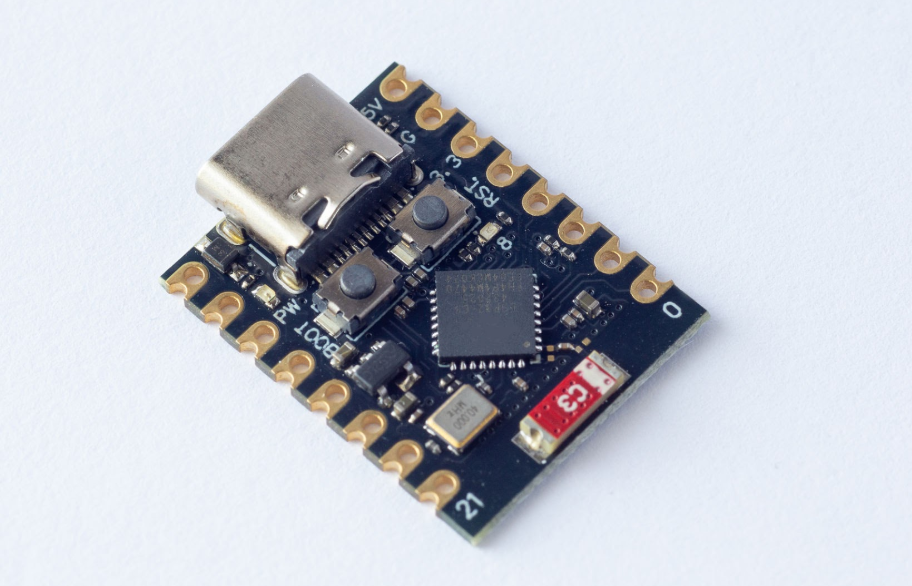
The finished architecture
Home Assistant / Node-RED / dashboard
                  │
                  ▼
        Mosquitto MQTT broker
            on Synology NAS
                  │ Wi-Fi
                  ▼
              ESP32-C3
                  │ GPIO
                  ▼
          LED, relay or driver
The microcontroller does not need to understand the whole automation. It subscribes to a command topic, changes the output and publishes its actual state. That separation keeps the central logic easy to modify and makes inexpensive wireless endpoints reusable.
What you need
- An ESP32-C3 development board.
- A USB data cable for flashing—not a charge-only cable.
- A stable 5 V supply sized for the board and connected load.
- Arduino IDE with Espressif’s ESP32 board package.
- The PubSubClient library.
- An MQTT broker reachable from the Wi-Fi network.
- A suitable transistor, MOSFET, relay module or LED driver when the load exceeds the GPIO rating.
Electrical warning: an ESP32 GPIO pin is a logic signal, not a power supply. Do not drive LED strips, motors, solenoids or mains-connected loads directly from it. Use a correctly rated driver stage and common ground where the circuit requires it.
Install ESP32-C3 support in Arduino IDE
- Open Arduino IDE preferences and add Espressif’s board-manager package URL.
- Open Boards Manager, search for esp32 by Espressif Systems and install it.
- Select ESP32C3 Dev Module, or the exact board definition supplied by the manufacturer.
- Select the detected USB port.
- Install PubSubClient through Library Manager.
Board-specific USB and boot settings vary. If the board is not detected, check that the cable carries data, try another USB port and use the board’s BOOT/RESET sequence if its documentation requires one.
Choose MQTT topics deliberately
I separate requested state, reported state and availability:
| Topic | Purpose | Example payload |
|---|---|---|
realmlabs/workshop/light/set | Command sent to the ESP32 | ON or OFF |
realmlabs/workshop/light/state | State confirmed by the ESP32 | ON or OFF |
realmlabs/workshop/light/availability | Online/offline status | online or offline |
The state and availability messages are retained. A dashboard or Home Assistant can therefore learn the latest condition immediately after reconnecting rather than waiting for another button press.
Keep credentials separate
Create a second Arduino tab named secrets.h and keep the real values out of any public repository:
#pragma once

const char* WIFI_SSID     = "YOUR_WIFI_SSID";
const char* WIFI_PASSWORD = "YOUR_WIFI_PASSWORD";

const char* MQTT_HOST     = "192.168.1.20";
const uint16_t MQTT_PORT  = 1883;
const char* MQTT_USER     = "esp32_lighting";
const char* MQTT_PASSWORD = "CHANGE_ME";
The example uses authenticated MQTT on a trusted local network. Port 1883 is not encrypted. If traffic crosses an untrusted network, use TLS with certificate validation rather than exposing a plain MQTT listener. Never forward the broker directly to the internet.
A more resilient ESP32-C3 MQTT sketch
The original proof of concept used a blocking reconnect loop and described itself as production-ready. This revised version is better described as production-minded: it uses MQTT authentication, a last-will message, retained state, a unique client ID and timed reconnect attempts that do not freeze the main loop.
#include <WiFi.h>
#include <PubSubClient.h>
#include "secrets.h"

WiFiClient networkClient;
PubSubClient mqtt(networkClient);

const char* SET_TOPIC   = "realmlabs/workshop/light/set";
const char* STATE_TOPIC = "realmlabs/workshop/light/state";
const char* AVAIL_TOPIC = "realmlabs/workshop/light/availability";

// Check the correct pin and polarity for your board or driver.
const uint8_t LED_PIN = 8;
const uint8_t LED_ON  = HIGH;
const uint8_t LED_OFF = LOW;

bool lightOn = false;
unsigned long lastMqttAttempt = 0;
const unsigned long MQTT_RETRY_MS = 5000;

void publishState() {
  mqtt.publish(
    STATE_TOPIC,
    lightOn ? "ON" : "OFF",
    true
  );
}

void applyLight(bool requestedState) {
  lightOn = requestedState;
  digitalWrite(
    LED_PIN,
    lightOn ? LED_ON : LED_OFF
  );
  publishState();
}

void onMessage(
  char* topic,
  byte* payload,
  unsigned int length
) {
  String message;

  for (unsigned int i = 0; i < length; i++) {
    message += static_cast<char>(payload[i]);
  }

  message.trim();
  message.toUpperCase();

  if (strcmp(topic, SET_TOPIC) != 0) {
    return;
  }

  if (message == "ON") {
    applyLight(true);
  }
  else if (message == "OFF") {
    applyLight(false);
  }
}

void connectWiFi() {
  WiFi.mode(WIFI_STA);
  WiFi.persistent(false);
  WiFi.setAutoReconnect(true);
  WiFi.begin(WIFI_SSID, WIFI_PASSWORD);
}

void connectMqttIfDue() {
  if (mqtt.connected()) {
    return;
  }

  if (WiFi.status() != WL_CONNECTED) {
    return;
  }

  unsigned long now = millis();

  if (now - lastMqttAttempt < MQTT_RETRY_MS) {
    return;
  }

  lastMqttAttempt = now;

  String clientId = "esp32c3-light-";
  clientId += String(
    static_cast<uint32_t>(ESP.getEfuseMac()),
    HEX
  );

  bool connected = mqtt.connect(
    clientId.c_str(),
    MQTT_USER,
    MQTT_PASSWORD,
    AVAIL_TOPIC,
    0,
    true,
    "offline"
  );

  if (connected) {
    mqtt.publish(AVAIL_TOPIC, "online", true);
    mqtt.subscribe(SET_TOPIC);
    publishState();
  }
}

void setup() {
  Serial.begin(115200);

  pinMode(LED_PIN, OUTPUT);
  digitalWrite(LED_PIN, LED_OFF);

  connectWiFi();

  mqtt.setServer(MQTT_HOST, MQTT_PORT);
  mqtt.setCallback(onMessage);
  mqtt.setBufferSize(256);
}

void loop() {
  if (WiFi.status() != WL_CONNECTED) {
    // ESP32 Wi-Fi auto-reconnect remains enabled.
    delay(10);
    return;
  }

  connectMqttIfDue();
  mqtt.loop();
  delay(2);
}
Test it before connecting the load
Test the messaging path with the onboard LED or a safe low-current output first. From a machine with Mosquitto clients installed:
mosquitto_sub -h 192.168.1.20 -u esp32_lighting -P 'YOUR_PASSWORD' -t 'realmlabs/workshop/light/#' -vIn another terminal, send commands:
mosquitto_pub -h 192.168.1.20   -u esp32_lighting -P 'YOUR_PASSWORD'   -t 'realmlabs/workshop/light/set'   -m 'ON'

mosquitto_pub -h 192.168.1.20   -u esp32_lighting -P 'YOUR_PASSWORD'   -t 'realmlabs/workshop/light/set'   -m 'OFF'
You should see the command, confirmed state and availability topics. Disconnecting the ESP32 unexpectedly should cause the broker to publish its retained offline last-will message.
Add it to Home Assistant
mqtt:
  switch:
    - name: "Workshop ESP32 Light"
      unique_id: workshop_esp32_light
      command_topic: "realmlabs/workshop/light/set"
      state_topic: "realmlabs/workshop/light/state"
      availability_topic: "realmlabs/workshop/light/availability"
      payload_on: "ON"
      payload_off: "OFF"
      payload_available: "online"
      payload_not_available: "offline"
      retain: false
After validating the YAML and restarting the relevant Home Assistant configuration, the switch should follow the state reported by the device rather than merely assuming every command succeeded.
Troubleshooting
The board repeatedly resets
Watch the serial output for brownout messages. Wi-Fi transmission and external lighting can create current spikes. Use a stable supply and never power a substantial load through the development board’s GPIO.
Wi-Fi connects but MQTT does not
- Confirm the broker address and port.
- Check the MQTT username, password and ACL permissions.
- Verify that the ESP32 network can reach the NAS firewall rule.
- Check for another client using the same MQTT client ID.
The LED behaves backwards
Some onboard LEDs and driver circuits are active-low. Swap the LED_ON and LED_OFF constants rather than reversing every branch of the program.
Commands work but the dashboard is stale
Confirm that the ESP32 publishes to the state topic after changing the output and that the state message is retained. The command topic represents a request; the state topic represents what the device actually applied.
Related RealmLabs projects
- Running Mosquitto MQTT centrally on Synology
- Moving MQTT without breaking automations
- Building a mobile MQTT control panel
- My wider Home Assistant platform
Final result
The ESP32-C3 is now a small, replaceable physical endpoint rather than another server to maintain. Synology and MQTT handle messaging, Home Assistant or Node-RED handles automation logic, and the microcontroller concentrates on reliable GPIO control and honest state reporting.
The same structure can be reused for relays, sensors, servo controllers and addressable lighting. The important improvement is not simply making an LED wireless; it is giving the device authentication, availability reporting, retained state and reconnect behaviour that make it dependable inside a larger system.