
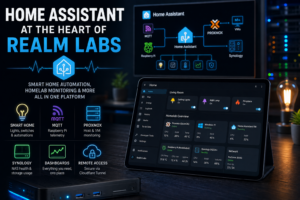

Home Assistant started in Realm Labs as a way to control smart-home devices from one place.
It has since grown into something much broader.
Today it sits between home automation, homelab monitoring, MQTT, Raspberry Pi projects, virtual machines, storage and remote access. It still controls lights and switches, but it also acts as an operational dashboard for systems that have nothing to do with traditional smart-home devices.
That flexibility is what has made Home Assistant one of the most useful platforms in Realm Labs.
What Home Assistant Does in Realm Labs
The current setup brings together a mixture of home automation and infrastructure.
Home Assistant is used for:
- lighting control
- smart plugs and switches
- bedroom and living-room devices
- automation routines
- MQTT sensors
- Raspberry Pi telemetry
- Proxmox monitoring
- virtual machine status
- Synology health data
- custom dashboards
- remote access
- service controls
That means Home Assistant is no longer just a smart-home interface.
It has become a single place to see what is happening across the wider environment.
Why I Chose Home Assistant
The biggest reason was flexibility.
I did not want every device to live permanently inside its manufacturer’s app.
Home Assistant gives me a common platform where different systems can work together.
A lighting automation might involve:
Home Assistant
    |
    +-- Smart bulb
    +-- Smart plug
    +-- Time trigger
    +-- MQTT state
A monitoring dashboard might use:
Home Assistant
    |
    +-- Proxmox metrics
    +-- Synology data
    +-- Raspberry Pi telemetry
    +-- VM status
The same platform can handle both.
Local Control
One of the things I value most is keeping as much control local as practical.
Cloud integrations still have their place, especially where they provide the easiest route into Home Assistant, but the main automation logic remains inside my own environment.
That means many routines can continue working without depending on a third-party application being open or a cloud dashboard being available.
It also makes it easier to combine devices from different ecosystems.
Lighting and Smart-Home Control
The most obvious part of the setup is lighting.
Home Assistant currently controls devices around areas such as:
- living room
- dining area
- bedroom
- fireplace-related automation
- smart lamps
- other connected lighting
Rather than keeping every device as an isolated switch, Home Assistant lets me group and automate them around how the room is actually used.
For example, one action can trigger several related devices instead of needing to control them individually.
Living Room Automation
A simple example is the living room.
Instead of treating every device independently, the dashboard brings together the lighting and fireplace controls into one place.
The logic can then be expanded further.
For example:
Living room light ON
        |
        v
Home Assistant automation
        |
        v
Fireplace state ON
The exact automation is simple, but the useful part is that the devices do not need to come from the same manufacturer.
Home Assistant becomes the layer that connects them.
Bedroom Control
The bedroom is another good example of why the platform works well.
Separate bed lights can be controlled independently while still appearing inside one dashboard.
That gives me a cleaner interface than switching between different apps or vendor dashboards.
It also means those lights can be reused later in automations involving time, presence or other conditions.
MQTT as a Core Integration
MQTT is one of the most useful pieces connecting Home Assistant to custom Realm Labs projects.
Several Raspberry Pi systems publish information through MQTT.
The pattern is straightforward:
Raspberry Pi
    |
    v
MQTT Broker
    |
    v
Home Assistant
A Pi can publish:
{
  "cpu_temp": 51.8,
  "cpu_usage": 12.4,
  "memory_usage": 38.7,
  "disk_usage": 46.2,
  "uptime": 345600
}
Home Assistant can then turn those values into sensors.
That makes custom Linux devices feel like native parts of the Home Assistant environment.
Raspberry Pi Monitoring
Raspberry Pi systems often sit in the background doing very specific jobs.
That makes them easy to forget about.
By publishing health data into Home Assistant, I can see:
- CPU temperature
- CPU usage
- memory usage
- disk usage
- uptime
- online status
This is especially useful for devices that normally run unattended.
Instead of logging into each Pi manually, I can see its basic health from the dashboard.
Proxmox Monitoring
Home Assistant is also used to surface parts of the Proxmox environment.
Useful values include:
- CPU load
- memory use
- disk usage
- temperature
- VM state
- host status
That gives me a quick operational view without always needing to open the Proxmox interface itself.
It is not a replacement for deeper infrastructure monitoring, but it is very useful for at-a-glance status.
Virtual Machine Control
Some virtual machines are also exposed to Home Assistant through status sensors and control buttons.
That can include actions such as:
- start
- restart
- shut down
- hibernate
- reset
- create snapshot
The benefit is convenience.
If a VM is part of a wider automation or lab workflow, I do not necessarily need to open a separate management interface just to see whether it is online.
Synology Monitoring
The Synology DS224+ is another important part of the environment.
Home Assistant can display useful NAS information such as:
- CPU usage
- memory usage
- volume usage
- temperature
- health status
The NAS is central enough to Realm Labs that having some visibility of it alongside the rest of the infrastructure is valuable.
If storage starts filling up or the system begins behaving unusually, I want to notice before applications start failing.
Home Assistant as a Monitoring Dashboard
This is where Home Assistant moved beyond a conventional smart-home role.
A dashboard can now show something like:
Home

Lights
Smart Plugs
Fireplace

Homelab

Proxmox
Synology
Raspberry Pi
Virtual Machines
Network Devices
That combination is one of the reasons I still use it heavily.
It gives me one interface for both physical devices and infrastructure state.
Prometheus and Grafana
Realm Labs also uses Prometheus and Grafana.
Those tools are better for:
- historical metrics
- detailed graphs
- PromQL queries
- trend analysis
- deeper infrastructure monitoring
Home Assistant is better for:
- quick status
- control
- automation
- simple operational views
The two approaches complement each other.
I do not need every Prometheus metric inside Home Assistant.
I only bring in the values that are genuinely useful for everyday visibility or automation.
Network Device Monitoring
Home Assistant can also surface information from network equipment.
That includes things such as:
- switch status
- port state
- device availability
- basic system health
Again, the aim is not to recreate a full network-management system.
It is to bring the most useful information into a dashboard I already use.
Dashboards
The dashboard design has changed a lot over time.
Initially it was mostly standard cards showing smart-home devices.
As the environment grew, the dashboards became more purpose-specific.
Some views are now focused on:
- living-room control
- bedroom lighting
- Proxmox and VMs
- Synology
- Raspberry Pi systems
- network status
- system metrics
I prefer dashboards that show the important information without becoming overloaded.
A dashboard should make it easier to understand the system, not become another system that needs interpreting.
Automation Logic
Automations are where Home Assistant becomes more powerful than a simple dashboard.
Triggers can come from:
- time
- sunrise
- sunset
- device state
- MQTT
- sensor thresholds
- network availability
- manual controls
Actions can then affect completely different systems.
For example:
MQTT sensor
    |
    v
Home Assistant
    |
    v
Notification
or:
Sunset
    |
    v
Home Assistant
    |
    v
Smart lighting
The devices involved do not need to understand each other directly.
Sunrise and Sunset
Sun-based automation is particularly useful for lighting.
Instead of using a fixed time such as:
18:00Home Assistant can react to:
sunsetor:
sunrisewith an optional offset.
That means the routine adapts naturally throughout the year.
It is a small example, but it shows why central automation is useful.
Remote Access
Home Assistant is also available remotely.
I did not want to expose port 8123 directly through the router.
Instead, remote access is handled through Cloudflare Tunnel.
The path looks like:
Internet
    |
    v
Cloudflare
    |
    v
Cloudflare Tunnel
    |
    v
Home Assistant
That keeps the service internal while still allowing controlled remote access.
Trusted Proxies
Running Home Assistant behind Cloudflare Tunnel introduced its own networking challenge.
Because the request arrives through a reverse proxy, Home Assistant needs to trust the proxy infrastructure providing forwarded client information.
That means configuring settings such as:
http:
  use_x_forwarded_for: true
  trusted_proxies:
    - 172.18.0.0/16
The exact network depends on how cloudflared is deployed.
The important lesson was that Home Assistant must trust the address it actually sees, not the address I assume it sees.
Home Assistant and Cloudflare Access
Cloudflare Access can also add another authentication layer before a user reaches Home Assistant.
Conceptually:
Remote User
    |
    v
Cloudflare Access
    |
    v
Cloudflare Tunnel
    |
    v
Home Assistant
Whether that is appropriate depends on the integrations and mobile access required, but it gives another option for controlling external access.
Device Naming Matters
As the number of entities grows, naming becomes increasingly important.
A few sensors with names like:
sensor_1
sensor_2
sensor_3
are manageable.
Hundreds are not.
I try to keep names descriptive enough that I can tell:
- what the device is
- where it is
- what the value represents
That saves a huge amount of time later when building dashboards or automations.
Entity Organisation
The same applies to the way devices are grouped.
I find it easier to think in terms of systems and rooms rather than individual integrations.
For example:
Living Room
Bedroom
Proxmox
Synology
Raspberry Pi
Network
That structure is more useful operationally than grouping everything by manufacturer.
Home Assistant as an Integration Layer
This is probably the best way to describe its role now.
Home Assistant sits between otherwise separate systems.
For example:
Raspberry Pi
      |
      v
     MQTT
      |
      v
Home Assistant
      |
      +--> Dashboard
      +--> Automation
      +--> Notification
Or:
Proxmox
      |
      v
Home Assistant
      |
      +--> Status
      +--> Controls
The platform is useful because it connects those systems without requiring each one to know about the others.
What Home Assistant Is Not
I do not try to make Home Assistant replace every other platform.
It is not my:
- full metrics database
- full network-monitoring platform
- hypervisor management system
- NAS management interface
Those tools still exist.
Home Assistant simply brings the useful bits together.
That keeps the platform useful without turning it into an overloaded replacement for everything else.
Reliability
As Home Assistant becomes more central, reliability matters more.
A broken dashboard is annoying.
A broken automation platform is more significant.
That means I pay attention to:
- backups
- configuration changes
- integration updates
- entity naming
- avoiding unnecessary complexity
The more things depend on Home Assistant, the less casually I can treat major changes.
Backups
Home Assistant configuration should be backed up just like any other important system.
The useful data includes:
- automations
- dashboards
- integrations
- helpers
- scripts
- configuration
- historical state where required
If the instance needs to be rebuilt, having that configuration available saves a lot of work.
What I Have Learned
Home Assistant has taught me that smart-home automation and homelab monitoring are not as separate as they first appear.
Both involve:
- states
- events
- sensors
- triggers
- actions
A smart bulb has a state.
So does a virtual machine.
A temperature sensor can trigger an automation.
So can a CPU temperature sensor.
A button can switch on a light.
It can also restart a service.
Once everything is represented as entities, the same automation model can be reused across very different systems.
The Biggest Benefit
The biggest benefit is not any individual integration.
It is having one place where systems can interact.
Without Home Assistant:
Tuya App
Home Assistant
Proxmox
Synology
MQTT
Raspberry Pi
Monitoring
all remain separate.
With Home Assistant:
             Home Assistant
                   |
      +------------+------------+
      |            |            |
   Smart Home     MQTT       Homelab
      |            |            |
   Lighting    Raspberry Pi   Proxmox
   Plugs                     Synology
That makes the environment much easier to operate.
The Result
Home Assistant has become one of the central platforms in Realm Labs.
It still performs the traditional smart-home jobs: controlling lighting, switches and automations.
But it now also provides visibility into Raspberry Pi systems, Proxmox, virtual machines, Synology storage and other infrastructure.
MQTT connects custom devices.
Cloudflare provides remote access.
Prometheus and Grafana handle deeper monitoring.
Home Assistant brings the useful parts together.
That combination has turned it from a smart-home experiment into a genuine operations layer for the lab.