
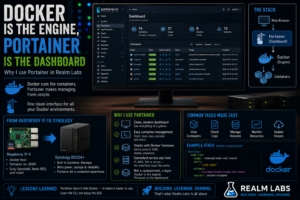

Portainer is probably one of the longest-running pieces of software in Realm Labs.
Long before the current Synology, Proxmox, Home Assistant and centralised automation setup existed, I was already using Docker on a Raspberry Pi.
And almost immediately, I put Portainer on top of it.
Over time, the hardware changed.
I moved from Raspberry Pi-based Docker hosts to a Synology DS224+ capable of running containers itself.
Synology eventually gave me its own Container Manager interface too.
Yet Portainer stayed.
The reason is simple.
I don’t really use Portainer instead of Docker.
I use Portainer because of Docker.
Docker is the engine underneath everything.
Portainer is the dashboard that makes managing it considerably more pleasant.
Where It Started: Docker on a Raspberry Pi
One of my earlier home-lab setups used a Raspberry Pi 4 as a Docker host.
The arrangement was fairly simple:
Raspberry Pi 4
     |
     v
   Docker
     |
     +-- OpenHAB
     +-- Node-RED
     +-- Other containers
     |
     v
  Portainer
Docker was doing the actual work.
Portainer simply gave me a web interface for controlling it.
Instead of spending all my time at:
docker ps
docker inspect
docker logs
and constructing increasingly long docker run commands, I could open a browser.
At the time, my Portainer interface was available on port:
9000
and that rapidly became my normal way of interacting with Docker.
Portainer Isn’t a Replacement for Docker
This is worth clearing up because the names are often spoken about as though they’re competing products.
They aren’t.
The stack is really:
Applications
     |
     v
Containers
     |
     v
Docker Engine
     ^
     |
 Portainer
     ^
     |
 Web Browser
Docker runs the containers.
Portainer talks to Docker and gives me a graphical way to manage them.
If I delete Portainer:
Docker keeps running.
The other containers keep running.
The networks remain.
The volumes remain.
Portainer is just the management layer.
I proved this to myself years ago when I needed to update Portainer on the Pi.
I stopped and removed the Portainer container, pulled a newer image and recreated it using the same persistent portainer_data volume.
Everything else continued running throughout.
That was the moment the distinction really clicked.
Why I Installed Portainer So Early
When I first started learning Docker, the command line wasn’t particularly difficult.
The problem was remembering everything surrounding a container.
An application might need:
Image
Ports
Volumes
Environment variables
Network mode
Restart policy
Container name
A command could quickly become:
docker run -d \
  --name application \
  --restart unless-stopped \
  -p 8080:80 \
  -v /some/path:/config \
  -e SOME_VARIABLE=value \
  application/image:latest
There’s nothing wrong with that.
But when you’re learning Docker while simultaneously learning whatever application you’re deploying, Portainer makes the whole arrangement much easier to visualise.
My Early OpenHAB Experiment
One of the earliest examples was OpenHAB on the Raspberry Pi.
Rather than building the entire deployment from the command line, I was using Portainer’s workflow:
Containers
    |
    v
Add Container
Then configure:
Image
Network
Volumes
Environment variables
Restart policy
and deploy it.
The OpenHAB attempt itself wasn’t completely painless.
I hit issues pulling:
openhab/openhab:latest
which led into questions around images, tags and ARM compatibility.
But Portainer made it much clearer which part of the deployment I was actually changing.
That helped while I was still getting comfortable with Docker.
Portainer Made Docker Visible
This is probably the biggest reason I kept it.
From one screen I can see:
Running containers
Stopped containers
Images
Volumes
Networks
Stacks
Logs
Resource usage
Without Portainer, all of that information still exists.
It’s just spread across Docker commands.
For example:
docker ps
shows containers.
Then:
docker images
shows images.
Then:
docker volume ls
shows volumes.
Then:
docker network ls
shows networks.
Portainer puts them together.
It Also Helped Me Understand Docker
Ironically, using a GUI didn’t stop me learning the command line.
It actually helped.
Portainer showed the relationship between:
Container
Image
Port
Volume
Network
Environment
in a way that was immediately visible.
Once I understood that relationship, the equivalent Docker and Compose configuration made much more sense.
It became:
Portainer teaches me what exists.

Docker CLI teaches me how it works.
I still use both.
Then Synology Entered the Picture
As Realm Labs developed, more of the infrastructure moved onto my Synology NAS.
The current storage platform is a:
Synology DS224+
Unlike some Synology models that don’t provide the same container capability, the DS224+ supports Synology’s container platform.
That meant the NAS could become a Docker host in its own right.
The architecture started changing from:
Raspberry Pi
     |
   Docker
     |
 Portainer
to:
Synology DS224+
      |
Container Platform
      |
   Containers
This was a fairly major step.
The Pi no longer had to be the machine running every service.
Synology Container Manager
Synology provides its own management interface for containers through DSM.
That interface is perfectly capable of performing the basics.
I can manage things such as:
Containers
Images
Projects
Networks
Resource usage
directly inside DSM.
So technically, I didn’t need Portainer anymore.
But I installed it anyway.
Why Keep Portainer If Synology Already Has a GUI?
Consistency.
That is probably the biggest reason.
Portainer works like Portainer regardless of whether the Docker host underneath it is:
Raspberry Pi
Linux server
Synology NAS
VM
The underlying hardware can change.
My management workflow doesn’t.
That became increasingly useful as Realm Labs expanded.
My Workflow Stayed the Same
On the Raspberry Pi I had learned:
Portainer
    |
    +-- Containers
    +-- Images
    +-- Networks
    +-- Volumes
    +-- Stacks
When I moved workloads to Synology, I could use exactly the same mental model.
I didn’t have to relearn container management around the NAS vendor’s interface.
That consistency matters more than I initially expected.
Stacks Became Particularly Useful
One Portainer feature I grew to like was stacks.
Instead of manually creating a container through dozens of individual fields, I could use Docker Compose-style YAML.
For example:
services:

  app:
    image: example/application:latest
    container_name: application

    ports:
      - "8080:80"

    volumes:
      - /volume1/docker/application:/config

    restart: unless-stopped
Then deploy it as a stack.
That gives me the convenience of Portainer while keeping the configuration visible.
This Is Better Than Clicking Everything Forever
The graphical Add Container workflow is excellent when experimenting.
But eventually I want the deployment itself documented.
A stack gives me that.
Instead of having to remember:
Which volume did I mount?
Which port did I use?
What environment variable did I add?
the YAML tells me.
That’s why my use of Portainer evolved.
Initially:
Portainer = easier way to create containers
Later:
Portainer = interface for managing Compose-based infrastructure
That’s a much healthier approach.
Synology Paths Fit Nicely into Stacks
The Synology also gave me a logical place for persistent container data.
For example:
/volume1/docker/
or similar project-specific directories.
A stack could contain:
volumes:
  - /volume1/docker/nodered:/data
That makes it immediately obvious where the data lives.
The container can disappear.
The data remains on the NAS.
Portainer Helped During Failed Deployments Too
Not every Realm Labs container worked first time.
Far from it.
One older example was a PXE experiment on the Synology.
I used Portainer to build a stack involving:
dnsmasq
nginx
with data stored beneath Synology paths.
Then I discovered that some of the Docker images I was trying to use either weren’t available or didn’t have the tags I expected.
Portainer made rebuilding and adjusting the stack quick while I worked through those issues.
That kind of experimentation is exactly where I find it useful.
Then There Was Pi-hole
Another Synology experiment involved trying to run Pi-hole through the container platform.
Again, Portainer/Container Manager wasn’t the actual limitation.
The underlying host was.
Pi-hole needed:
DNS port 53
and the Synology was already using it.
I could map its web interface:
8181 -> 80
without a problem.
But normal DNS still needed:
53
That eventually led to Pi-hole moving elsewhere.
This was an important Docker lesson.
A container management GUI can make deployment easy.
It cannot override the fundamental limitations of the host.
The Same Happened with WireGuard
WireGuard was another good example.
I could define the container perfectly well.
Portainer could deploy it.
But the Synology kernel didn’t provide what WireGuard needed.
The result was:
For the practical setup side, see Installing Docker and Portainer on Raspberry Pi. If you already run Portainer and need to upgrade it safely, see Updating Portainer Without Losing Your Containers.
RTNETLINK answers: Not supported
Again:
Portainer wasn't broken.
Docker wasn't broken.
The host simply couldn’t provide the required kernel capability.
That distinction became much easier to understand as I got more comfortable with the layers.
Portainer Doesn’t Hide the Command Line
If something goes wrong, I still drop into SSH.
For example:
docker ps
docker logs container-name
docker inspect container-name
docker network inspect network-name
Portainer is not an excuse to avoid learning Docker.
It is simply my preferred normal management interface.
The CLI remains the troubleshooting tool underneath it.
I Use Both
My actual workflow is probably best described as:
Normal management
      |
      v
Portainer

Troubleshooting
      |
      v
Docker CLI

Repeatable deployments
      |
      v
Compose / Stacks
I don’t see any need to choose one.
They complement each other.
Why Not Just Use Synology Container Manager?
There is nothing particularly wrong with Synology Container Manager.
In fact, it’s useful to have.
If Portainer itself breaks, I still have another way into the container environment.
But I prefer Portainer for day-to-day management because it isn’t tied to Synology.
That’s especially relevant to Realm Labs.
Today a container may live on:
Seido
Tomorrow I could move it to:
Proxmox
or:
A Raspberry Pi
or:
Another Linux host
The application changes location.
Portainer’s workflow doesn’t need to change.
Portainer Also Makes Migration Easier to Think About
A good container should be portable.
The architecture I aim for is:
Container
    |
    +-- Image
    +-- Environment
    +-- Ports
    +-- Persistent volume
If all of that is documented in a stack, moving the workload becomes much easier.
For example:
Old Docker Host
      |
      v
Copy persistent data
      |
      v
New Docker Host
      |
      v
Deploy same stack
That’s exactly the kind of flexibility I want in a home lab.
Why I Don’t Treat the Synology as Special
This might sound odd because the DS224+ is one of the most important machines in Realm Labs.
But for containers, I don’t particularly want application configuration that only makes sense inside DSM.
I want:
Docker-style configuration
that I can understand and move elsewhere.
Portainer helps maintain that separation.
The Synology provides:
Compute
Storage
Networking
Portainer manages:
Containers
The application doesn’t need to care that the hardware happens to be a NAS.
Portainer Itself Is Disposable
Another thing I like is that Portainer follows the same rule as the containers it manages.
The Portainer container itself can be deleted.
Its persistent state lives separately in:
portainer_data
So an update is essentially:
Stop Portainer
      |
      v
Remove old container
      |
      v
Pull new image
      |
      v
Recreate container
      |
      v
Reconnect portainer_data
The managed Docker environment carries on underneath it.
That is a reassuring design.
My Container Management Evolution
Looking back, my own progression was roughly:
Stage 1

Raspberry Pi
   |
Docker CLI
Then:
Stage 2

Raspberry Pi
   |
Docker
   |
Portainer
Then:
Stage 3

Synology DS224+
   |
Container platform
   |
Portainer
And now:
Stage 4

Multiple infrastructure platforms
       |
       v
Docker / Containers
       |
       v
Compose-style definitions
       |
       v
Portainer for management
The technology became more complicated.
My management interface actually became more consistent.
Would I Start with Portainer Again?
Absolutely.
Especially for somebody learning Docker.
Not because the command line is too difficult.
But because Portainer makes the architecture visible.
You can see:
This container uses this image.

This port maps here.

This folder maps there.

This network connects these containers.

This volume contains the persistent data.
Once that makes sense visually, Docker Compose becomes considerably less mysterious.
But Learn Docker Underneath It
I wouldn’t recommend treating Portainer as magic.
Eventually, you need to understand:
Host port vs container port

Bind mount vs volume

Container vs image

Bridge vs host networking

Environment variables

Restart policies

Persistent data
When something goes wrong, those concepts matter far more than which button you clicked in Portainer.
Why I Still Use It Today
Portainer has survived several generations of Realm Labs because it solves a very simple problem well.
Docker is incredibly powerful.
But I don’t need every interaction with Docker to be a terminal session.
Sometimes I just want to open a browser and see:
Home Assistant     Running

Node-RED           Running

Mosquitto          Running

Grafana            Running

Portainer          Running
Then open a container, inspect its logs, restart it or edit a stack.
Portainer makes that effortless.
The Realm Labs Takeaway
I sometimes describe the setup as:
I use Portainer instead of Docker.
But technically that isn’t right.
The better description is:
Docker runs Realm Labs containers.

Portainer is how I prefer to manage Docker.
The relationship is:
                   Portainer
                       |
                       v
                    Docker
                       |
        +--------------+--------------+
        |              |              |
        v              v              v
    Node-RED        Mosquitto       Grafana
I started using that arrangement on a Raspberry Pi.
Later, Synology models such as my DS224+ gave me a capable container host with its own management interface.
But Portainer stayed because the hardware underneath stopped mattering.
Whether I’m running containers on a Pi, NAS or another Linux system, I get the same familiar interface and the same workflow.
Docker is the engine.
Portainer is the dashboard.
And after years of using both, that’s still the combination I prefer.