
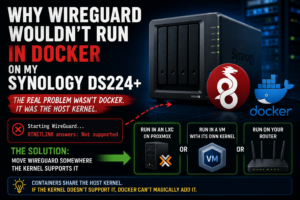

After getting more and more of Realm Labs running on my Synology DS224+, I started looking at what else I could move onto it.
WireGuard seemed like an obvious candidate.
I was already using Docker extensively on the NAS, so the plan was simple: deploy a WireGuard container, expose the required UDP port, create a few peers and use it for secure remote access back into the home network.
The container deployed.
The configuration looked reasonable.
Then WireGuard failed with an error that initially made it look like I’d done something wrong inside Docker:
RTNETLINK answers: Not supported
That sent me down the usual path of checking container settings, capabilities and network configuration.
The real problem turned out to be underneath Docker entirely.
The Synology host itself didn’t provide what WireGuard needed.
The Original Plan
At this point, my DS224+ was already doing far more than simply storing files.
It was running Docker services and had become an important part of the Realm Labs infrastructure.
Adding WireGuard to the same machine seemed sensible.
The proposed setup was essentially:
Internet
   |
Router
   |
UDP 51820
   |
Synology DS224+
   |
Docker
   |
WireGuard
   |
Home Network
Using the linuxserver/wireguard image also meant most of the configuration could be kept inside the container.
In theory, it was exactly the sort of service Docker is perfect for.
Deploying the WireGuard Container
A typical WireGuard Docker deployment needs access to networking capabilities that an ordinary application container may never use.
A simplified Compose configuration looks something like:
services:
  wireguard:
    image: lscr.io/linuxserver/wireguard:latest
    container_name: wireguard
    cap_add:
      - NET_ADMIN
      - SYS_MODULE
    environment:
      - PUID=1026
      - PGID=100
      - TZ=Europe/London
    volumes:
      - /path/to/wireguard/config:/config
      - /lib/modules:/lib/modules
    ports:
      - 51820:51820/udp
    restart: unless-stopped
The important parts are the additional networking permissions and access to the host’s kernel modules.
That last part would eventually prove important.
The Error
When the container attempted to configure its WireGuard interface, it failed with:
RTNETLINK answers: Not supported
This isn’t a particularly helpful error when you first encounter it.
It sounds like the network configuration itself is wrong.
So I started checking the obvious things.
Was the container privileged enough?
Was NET_ADMIN enabled?
Was the interface name wrong?
Was UDP 51820 already in use?
Was Docker’s networking getting in the way?
None of those were the real issue.
Docker Containers Don’t Have Their Own Kernel
This was the important bit.
Docker containers can make applications look isolated from the host, but they don’t contain an entirely separate operating system.
They share the host’s Linux kernel.
That means a container can package:
WireGuard tools
Configuration
Scripts
Libraries
Web interfaces
but if those tools require a kernel feature that the host doesn’t provide, Docker can’t manufacture that feature by itself.
The relationship looks more like this:
WireGuard Container
        |
        | requests WireGuard networking
        v
Docker
        |
        v
Synology Linux Kernel
        |
        X
Required feature unavailable
That was why changing container settings wasn’t fixing anything.
The failure was occurring at the host-kernel level.
Checking for WireGuard Support
On a normal Linux machine, one of the first checks would be:
lsmod | grep wireguard
If the WireGuard module is loaded, you’d expect to see it listed.
You can also try:
modprobe wireguard
On a system where the module isn’t available, that will normally fail.
Another useful place to look is:
ls /lib/modules/$(uname -r)/
The exact behaviour varies depending on the Linux distribution and whether WireGuard support is built directly into the kernel or supplied as a module.
But the important question is the same:
Does the host kernel actually support WireGuard?
In my case, the answer on the Synology was effectively no.
Why SYS_MODULE Didn’t Fix It
The Docker configuration included:
cap_add:
  - SYS_MODULE
At first glance that sounds like it should allow the container to load whatever kernel module it needs.
There’s a catch.
SYS_MODULE allows the container to request that a module be loaded.
It doesn’t provide the module.
If the host doesn’t have the required kernel support available, granting the container more permissions won’t help.
It’s the equivalent of giving someone permission to open a cupboard that doesn’t contain the thing they’re looking for.
Mounting /lib/modules Didn’t Fix It Either
Another common part of WireGuard Docker examples is:
volumes:
  - /lib/modules:/lib/modules
Again, this makes sense.
It gives the container visibility of the modules installed on the host.
But it still doesn’t create missing modules.
So:
Container needs WireGuard
        |
        v
/lib/modules mounted
        |
        v
Host has no usable WireGuard module
        |
        v
Still doesn't work
At this stage it became clear that I was trying to solve the wrong problem.
Could I Force WireGuard Onto the Synology?
Possibly.
There are community packages, custom kernel modules and other ways people have added unsupported functionality to NAS devices.
But that wasn’t really what I wanted.
The DS224+ had become an increasingly important machine in Realm Labs.
It was handling storage and other infrastructure services reliably.
Installing unofficial kernel modules purely to make one Docker container work would have introduced another layer of maintenance every time DSM or the underlying kernel changed.
The goal was secure remote access.
Not turning the NAS into a kernel-development project.
The Better Solution: Move WireGuard Somewhere Else
Instead of continuing to fight the Synology, I moved the VPN function to infrastructure better suited to it.
At various stages of Realm Labs I’ve run WireGuard using dedicated Linux/virtualised infrastructure and later through the network hardware itself.
The important architectural change was separating the VPN endpoint from the NAS.
Rather than:
Synology
├── Storage
├── Docker
├── DNS
├── Other services
└── WireGuard
I could use:
Synology
├── Storage
├── Docker services
└── Core NAS functions

Separate VPN endpoint
└── WireGuard
That gives the VPN system direct control over the networking features it requires without changing the Synology kernel.
Why an LXC or VM Is a Better Fit
If I were deploying WireGuard on Proxmox, there are two obvious choices.
A lightweight Linux container:
Proxmox
   |
WireGuard LXC
   |
Dedicated IP
or a small virtual machine:
Proxmox
   |
Linux VM
   |
WireGuard
A VM has one major advantage in situations like this: it has its own kernel.
That completely removes the dependency on whatever kernel Synology DSM happens to provide.
The distinction is important:
Docker container
    -> shares host kernel

LXC container
    -> also uses host kernel

Virtual machine
    -> runs its own kernel
So whenever a service has unusual kernel requirements, a VM can often be the cleanest solution.
Eventually, the Router Became the Best VPN Endpoint
As the Realm Labs network evolved, I also experimented with running WireGuard directly through my Deco network.
That makes architectural sense too.
A VPN is fundamentally a network service.
Running it at the edge of the network means remote traffic can enter the network without depending on a NAS or another application server being available.
The path becomes:
Remote Device
      |
   Internet
      |
      v
Router / VPN Server
      |
      v
Realm Labs Network
Compare that with:
Remote Device
      |
   Internet
      |
      v
Router
      |
Port Forward
      |
      v
NAS
      |
Docker
      |
WireGuard
The first version has far fewer moving parts.
The Real Lesson: Docker Isn’t a Virtual Machine
This project reinforced one of the most important things to understand about containers.
Docker packages applications.
It doesn’t virtualise the complete computer underneath them.
A container can still depend on:
- Kernel modules
- CPU architecture
- Host networking features
- Device drivers
- Filesystem capabilities
- Hardware devices
- Security features provided by the host
So when a container produces an error such as:
Operation not supported
or:
RTNETLINK answers: Not supported
it’s worth looking below Docker before endlessly changing Compose files.
A Useful Troubleshooting Process
If you’re trying to run WireGuard in Docker and encounter similar errors, I’d work through the problem in this order.
1. Check the container logs
docker logs wireguard
Look for networking and kernel-related errors rather than just Docker startup errors.
2. Check that NET_ADMIN is enabled
WireGuard needs permission to configure networking:
cap_add:
  - NET_ADMIN
3. Check whether the image expects SYS_MODULE
Some deployments also use:
cap_add:
  - SYS_MODULE
4. Check whether /lib/modules is available
volumes:
  - /lib/modules:/lib/modules
5. Check the host itself
uname -r
lsmod | grep wireguard
modprobe wireguard
The exact commands available will vary between platforms, but you’re trying to establish whether the host actually provides the functionality the container needs.
6. Stop changing Docker settings if the host doesn’t support it
At that point, the better solution is usually to move the workload.
What I Would Do Today
Knowing what I know now, I wouldn’t attempt to make the Synology my WireGuard server.
The DS224+ is excellent at what I’m using it for:
Storage
Docker applications
DNS
File services
Domain services
Backups
But that doesn’t mean every network service has to live there.
For WireGuard, I’d rather use:
Router
or:
Dedicated Linux VM
or another host where I have full control of the networking stack.
The Bigger Home Lab Lesson
One of the traps when building a home lab is gradually turning the most reliable machine into the machine that does everything.
The NAS starts as:
Storage
Then it becomes:
Storage
+ Docker
Then:
Storage
+ Docker
+ DNS
+ Authentication
+ Monitoring
+ VPN
+ Everything else
It works until one service needs something the platform wasn’t really designed to provide.
That’s exactly what happened here.
The Synology hadn’t failed.
Docker hadn’t failed.
WireGuard hadn’t failed.
I’d simply reached the boundary of what that particular combination of host and container could provide cleanly.
And rather than forcing it, the better answer was to move the service somewhere more appropriate.
Final Result
For the broader remote-access design, see Secure Remote Access to a Homelab with WireGuard. If the issue is container networking rather than WireGuard itself, the Pi-hole vs Synology DNS port 53 troubleshooting article covers another common Synology container conflict.
The failed WireGuard container actually improved the Realm Labs architecture.
Instead of continuing to stack network-critical services onto the NAS, I started treating the different systems according to what they’re best at.
Synology
    |
    ├── Storage
    ├── DNS
    ├── Docker applications
    └── Infrastructure services

Proxmox / Router
    |
    └── Network services such as WireGuard
The error that started the whole investigation was:
RTNETLINK answers: Not supported
The useful translation turned out to be:
Stop troubleshooting the container.

Check whether the host can actually do what the container is asking for.
That’s a lesson I’ve carried into plenty of Docker troubleshooting since.