
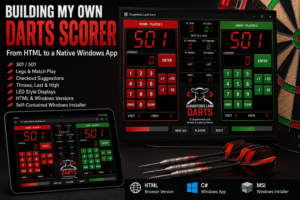

I have had some form of homemade darts scorer kicking around since 2021.
Like quite a few of my projects, it started with a fairly simple requirement: I wanted an electronic scoreboard beside the dartboard without spending silly money on a commercial unit.
The first working version was a Windows application written in C# using WinForms. It did the job, but over time I kept adding features, changing the layout and finding little things that annoyed me.
More recently I decided to revisit the whole project properly.
That resulted in two separate versions of the same scorer:
- A browser-based HTML version designed primarily around a tablet
- A native Windows version written in C# and packaged as a proper self-contained Windows application
They share the same general purpose and visual identity, but each has its own strengths.
The finished scorers
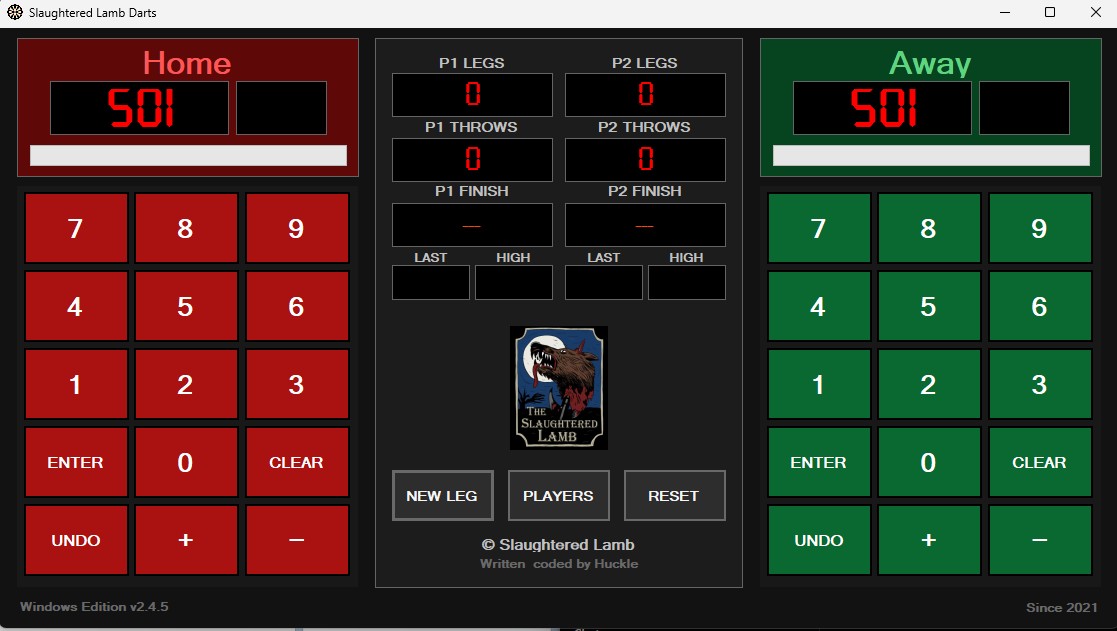
The Windows edition is deliberately styled like a traditional pub darts scoreboard. Player One gets the red Home side, Player Two gets the green Away side, with match information running down the centre.
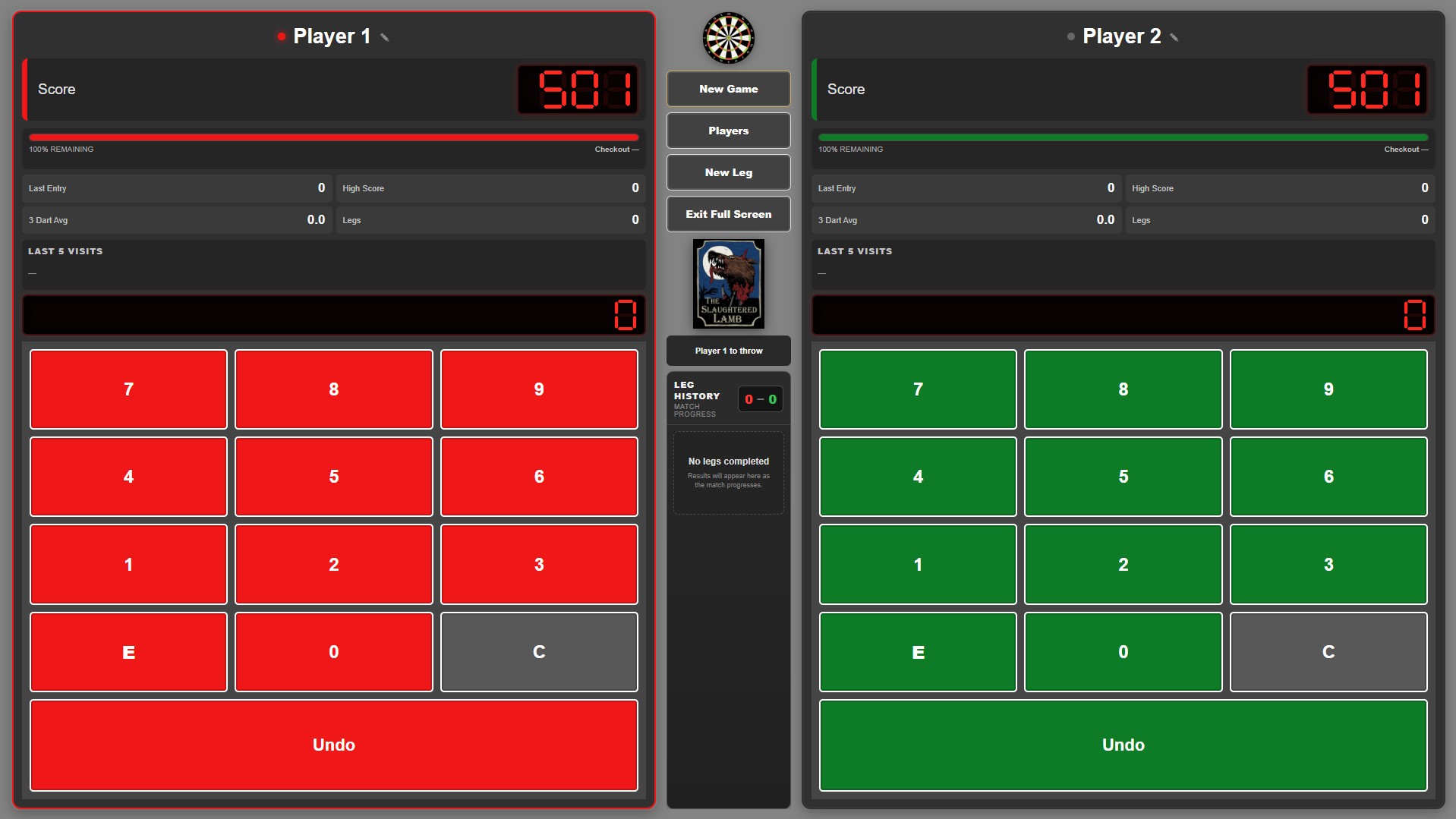
The HTML version takes the same basic idea but uses the extra flexibility of a browser layout to expose considerably more match information.
At this point both versions support the things I actually want when playing:
- 301 and 501
- Two-player scoring
- Match and leg tracking
- Checkout suggestions
- Undo
- Last visit
- Highest visit
- Progress through the leg
- Player names
- Proper red LED-style scoring displays
The objective was never to compete with DartConnect or build a commercial scoring platform.
I just wanted a darts scorer that worked the way I wanted it to.
Starting again with HTML
The browser version came from the idea of using a tablet as a dedicated scoreboard.
That seemed like the obvious approach.
Rather than install software, I could host a simple web application locally and then point practically any browser at it.
In theory:
Open browser → load scorer → play darts.
That part is still one of the strongest arguments for the HTML version.
There is no installation process and an update only needs to happen once on the server.
The application is just HTML, CSS and JavaScript, making it very easy to host on a local web server.
Starting a new match
Rather than immediately dropping players into a 501 game, the HTML version now starts with a proper match setup screen.
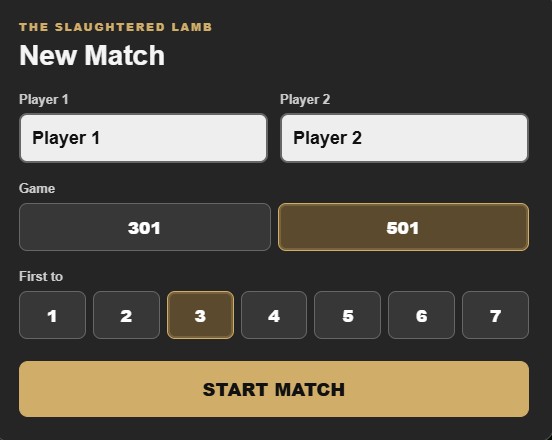
From here I can:
- Enter both player names
- Select 301 or 501
- Choose the number of legs required to win
For example, I can select 501 and First to 3 and start a normal casual match without changing anything else in the application.
The layout is deliberately large and touch friendly because the primary target is a tablet rather than a mouse and keyboard.
The HTML scoreboard
Once the match starts, both players get their own scoring area.
The left side is red and the right side is green.
In the middle is the match control and Slaughtered Lamb branding.
The web edition currently displays:
- Remaining score
- Current score entry
- Checkout
- Percentage remaining
- Last entry
- High score
- Three-dart average
- Legs
- Last five visits
- Current player
- Leg history
- Match progress
I particularly like the Last 5 Visits area.
It gives enough history to spot what has happened recently without turning the scoreboard into a spreadsheet.
The centre section also keeps track of who is currently throwing, which becomes useful once a few legs have been played.
Changing player names
Player names can be changed without rebuilding or resetting the application.
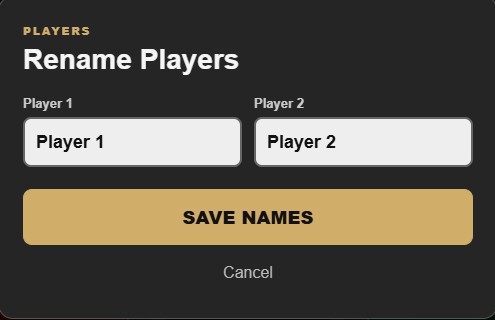
It is a small feature, but one that makes the scorer feel like a proper reusable application rather than a hard-coded project.
Starting another leg
The web version also separates starting a new leg from starting a completely new match.
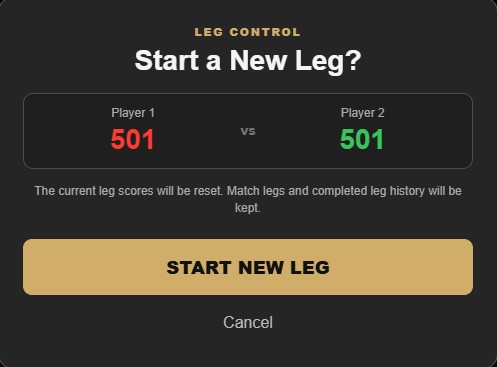
Starting a new leg resets the current scores while retaining:
- Match legs
- Completed leg history
- Player names
- Match configuration
That distinction became important once I started adding proper match tracking.
Originally, reaching zero effectively meant resetting everything.
That was fine for a proof of concept.
It was not particularly useful for an actual match.
Tablet problems
One of the more interesting parts of building the HTML version was discovering that browser-based does not automatically mean device-independent.
The target tablet is a Lenovo with a 1280×800 display.
That should have been ideal.
Instead I ran into:
- Black screens
- Controls disappearing
- Keypads becoming squashed
- Different behaviour between browsers
- Fullscreen problems
- Browser address bars refusing to hide
- Buttons appearing but not responding
- Scaling differences between desktop and tablet browsers
At one point the exact same build behaved differently on Edge running on a laptop compared with Edge running on the tablet.
Eventually I stopped trying to make the interface infinitely responsive and treated 1280×800 as a specific target layout.
That meant being much stricter with:
- dimensions
- overflow
- container heights
- keypad sizing
- viewport behaviour
- fullscreen handling
Once that was done, the HTML version became stable enough to use as a dedicated scorer.
Revisiting the Windows version
While I was working on the browser scorer, I kept coming back to the original Windows application.
There was nothing fundamentally wrong with it.
The scoring logic worked and it already contained much of the functionality I needed.
It just looked like an old WinForms utility.
So rather than abandon it, I decided to bring it up to the same standard as the new web version.
The result is the current Slaughtered Lamb Darts Windows Edition.
Designing it like a pub scoreboard
The Windows interface is intentionally simpler than the web edition.
I wanted something that could sit beside the board and be read instantly.
The main areas are:
Home
Red keypad and scoring display.
Away
Green keypad and scoring display.
Centre
Match information and controls.
The centre currently displays:
- P1 Legs
- P2 Legs
- P1 Throws
- P2 Throws
- P1 Finish
- P2 Finish
- Last score
- Highest score
The Slaughtered Lamb logo sits underneath followed by:
- New Leg
- Players
- Reset
At the bottom I added:
© Slaughtered Lamb
Written & coded by Huckle
It is completely unnecessary.
I like it anyway.
LED-style scoring
One of the things that made the biggest visual difference was changing the normal Windows text into proper seven-segment displays.
The main score is now shown as large red digits against black.
The same style is used for:
- Score
- Current entry
- Legs
- Throws
- Last
- High
It makes the application look much more like a physical electronic darts scorer.
Embedding the seven-segment font
Initially the Windows application simply requested a font installed on my development PC.
That works perfectly until the EXE is moved to another machine.
If the font is missing, Windows quietly substitutes something else.
That ruined the whole effect.
The solution was to embed the seven-segment font into the application and load it at runtime using a PrivateFontCollection.
There was another WinForms-specific wrinkle.
Private fonts do not always render properly through the normal Windows Label text renderer.
The result was that the correct font was technically loaded, but Windows still displayed a fallback font.
The fix was to use GDI+ compatible text rendering for the LED controls.
After that, the seven-segment font travelled with the application.
No font installation is required on the destination PC.
Small layout details matter
Getting 501 onto the screen sounds trivial.
It ended up taking several iterations.
The main score:
- sat too high
- moved independently of the input display
- became visually unbalanced
- needed a little more vertical padding
Eventually I stopped moving the actual control and instead adjusted the position of the glyphs inside the LED display.
The score box and input box now stay perfectly aligned while the digits sit slightly lower inside the black display.
That sort of tiny adjustment has absolutely no effect on how the scorer works.
It makes a surprisingly big difference to how finished it looks.
Entering player names
The Windows application has its own player setup window.
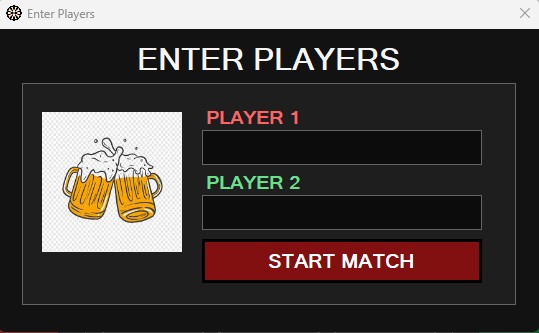
Earlier versions included extra wording about starting a 501 game.
That eventually felt unnecessary.
The window now does one thing:
Enter Players.
Player One and Player Two are entered, Start Match is pressed and the names are transferred to the main scoreboard.
Simple is better.
Match setup on Windows
New Leg opens a match configuration window.
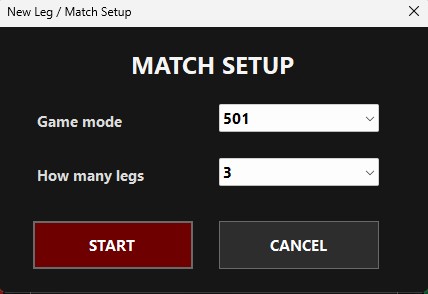
From here I can select:
Game mode
- 301
- 501
Legs
The required match length.
The selected mode also changes the underlying scoring logic.
For example, a 301 match does not just display 301 while the progress bar continues thinking the starting score was 501.
The starting score now drives:
- Player score
- Progress bars
- Leg reset
- Match reset
That sounds obvious now, but it is exactly the kind of hard-coded value that survives in a project longer than expected.
Legs and throws
The original Windows version only really understood a single game.
When someone hit zero, everything reset.
The current version properly separates a leg from a match.
When a player wins a leg:
- Their leg count increments.
- The current leg is completed.
- Both players return to the selected starting score.
- Throw counters reset.
- Visit information resets.
- The match continues.
Throws are counted as submitted visits.
Importantly, a bust still counts as a visit.
The darts were thrown even if the score was invalid.
Checkout suggestions
Both versions now provide checkout information.
When a player’s remaining total can be finished, the scorer displays a suggested route.
For example:
T20 T20 BULL
for 170.
If there is no checkout available, the display simply shows:
---
This is especially useful during casual games.
The later the evening gets, the more useful it becomes.
Undo and score correction
Any scorer used by humans needs an undo button.
Both players therefore have:
- Undo
- adjustment
- − adjustment
Undo restores the previous score state.
The manual adjustment buttons are useful when someone notices that the wrong score was entered after play has already moved on.
The current logic also avoids recording an invalid bust state into the undo history.
That was one of the bugs cleaned up while rebuilding the application.
Progress bars
Both player panels contain a progress bar beneath the score.
It is not essential to the scoring logic, but visually it works very well.
At a glance you can see how far each player has progressed through the leg.
Once I moved Last and High into the centre panel, I was able to make the progress bars thicker as well.
Again, a small change, but one that improved the overall layout.
Publishing the Windows version
Once the application was stable, I wanted to be able to install it on another Windows machine without worrying about dependencies.
The application currently targets:
- .NET 8
- Windows
- x64
The Visual Studio publish profile is configured as:
- Configuration: Release
- Target Framework: net8.0-windows
- Deployment Mode: Self-contained
- Target Runtime: win-x64
- Produce Single File: enabled
Self-contained publishing means the destination machine does not need the .NET 8 Desktop Runtime installed separately.
The required runtime travels with the application.
The trade-off is file size.
The resulting EXE is substantially larger than a normal framework-dependent build.
For this application, that is absolutely worth it.
Building a proper Windows installer
Once I had a self-contained EXE, the next step was packaging it like a normal Windows application.
I added a Visual Studio Installer Project to the solution.
The installer places the program under:
C:\Program Files\Slaughtered Lamb\Darts
and adds the usual Windows installation metadata.
The Setup Project contains:
- Dart Board.exe
- Start Menu shortcut
- Desktop shortcut
- Application icon
- Manufacturer
- Product name
- Version
- Upgrade information
The result is a normal .msi installer.
That means the scorer appears in Windows Apps & Features and can be removed in the same way as any other installed application.
x86 versus x64
The first installer build technically succeeded but produced an important warning:
Dart Board.exe targeting x64 is not compatible with the project's target platform x86
The application had been published as win-x64.
The Setup Project was still targeting x86.
Changing the installer project to x64 removed the mismatch.
That was a good reminder that:
A successful build does not necessarily mean a clean build.
Warnings are worth reading.
Making future versions upgrade properly
The first time I tried to install a newer build, Windows reported that the application was already installed and had to be removed first.
That was not the behaviour I wanted.
The Setup Project now uses:
RemovePreviousVersions = True- An incremented Version for every release
- A new ProductCode when the Version changes
- The same UpgradeCode between releases
The UpgradeCode identifies the application family.
The ProductCode identifies that specific package.
This means a future version can replace the currently installed release rather than creating a duplicate installation or demanding a manual uninstall.
The installer icon rabbit hole
The application icon itself works correctly.
The EXE has the dartboard icon.
The running application has the dartboard icon.
The WinForms windows use the dartboard icon.
A manually created Windows shortcut also uses the dartboard icon.
Yet the shortcut generated by the MSI installer initially insisted on showing a generic Windows shortcut image.
This was one of those problems where breaking the issue down was far more useful than blindly changing code.
I tested each layer individually:
- EXE icon: correct
- Form icon: correct
- Taskbar icon from EXE: correct
- Manual shortcut: correct
- MSI shortcut: wrong
At that point there was very little reason to keep touching the application code.
The issue was clearly in how Windows Installer was creating the shortcut.
Packaging software can be fun.
HTML versus Windows
Now that both versions exist, I do not really see one as replacing the other.
They suit slightly different jobs.
HTML edition
The browser version is better when portability matters.
Advantages include:
- No installation
- Central updates
- Works across different devices
- Ideal for a tablet
- More room for match statistics
- Easy to host locally
- Accessible over the network
The downside is browser behaviour.
Different devices can introduce unexpected layout and fullscreen issues.
Windows edition
The Windows version is my preferred dedicated scorer.
Advantages include:
- Predictable layout
- Native Windows application
- No browser chrome
- Embedded fonts
- Consistent rendering
- Self-contained .NET deployment
- Proper installer
- Start Menu and Desktop integration
If I have a Windows laptop or PC permanently beside the board, this is the version I would use.
If I want to grab a tablet and start playing, the HTML edition makes more sense.
Download the Windows version
The current Windows build is available as a direct download.
Download Slaughtered Lamb Darts v2.4.5 for Windows
The Windows edition is a 64-bit, self-contained build, so the destination machine does not need a separate .NET 8 installation.
It includes the native Windows scorer, 301/501 match setup, configurable legs, checkout suggestions, embedded seven-segment displays and the Slaughtered Lamb interface shown throughout this article.
A note about fonts and artwork
The source code itself is straightforward to share.
Fonts and artwork are a slightly different matter.
The Windows application embeds a custom seven-segment font.
Before redistributing that font inside a public repository, I need to confirm that its licence permits redistribution.
The same applies to any artwork or third-party resources.
If necessary, the public repository can contain the application code with instructions explaining where the user needs to provide their own font or image resource.
That is preferable to accidentally redistributing something I do not have permission to distribute.
What this project ended up covering
What began as a simple darts scoreboard has now involved:
- C#
- WinForms
- HTML
- CSS
- JavaScript
- Responsive layouts
- Tablet browser compatibility
- Match-state management
- Checkout logic
- Undo history
- Font embedding
- GDI+ rendering
- .NET 8
- Self-contained publishing
- Windows application resources
- MSI packaging
- x64 deployment
- Windows shortcuts
- Application upgrades
That is exactly why I like projects like this.
The final interface is simple.
Walk up to it, enter two names and throw some darts.
The interesting bit is everything hidden behind that simplicity.
Current state
The Windows application has now reached the point where I would consider it properly usable rather than just another prototype.
The current feature list includes:
- 301
- 501
- Two players
- Configurable match length
- Legs
- Throws
- Checkout suggestions
- Last visit
- Highest visit
- Undo
- Manual score adjustment
- Progress bars
- Embedded seven-segment displays
- Player naming
- Slaughtered Lamb branding
- Self-contained .NET deployment
- MSI installer
The HTML edition provides the same core scoring functionality along with additional match statistics and history in a browser-friendly interface.
Neither is intended to become a commercial darts platform.
They are simply the darts scorers I wanted beside my own board.
After starting the project back in 2021, it finally feels pretty complete.
Which normally means I will think of something else to add next week.