
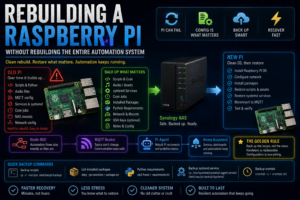

Raspberry Pis are brilliant little machines, but after you’ve used one for a few years, they tend to accumulate jobs.
A script gets added here.
A cron job gets added there.
A sound file lives in one directory.
Node-RED controls something else.
MQTT gets installed.
Then a few GPIO scripts appear.
Eventually, the Pi becomes important enough that the thought of rebuilding it becomes slightly terrifying.
That was the situation I ended up with in Realm Labs.
One of my Raspberry Pis had gradually become responsible for several automation tasks, including hardware control, MQTT communication, Python scripts and audio playback.
The Pi itself wasn’t irreplaceable.
The configuration was.
So I wanted a rebuild process that meant I could wipe the Raspberry Pi, reinstall the operating system and get it back into service without rebuilding the whole automation system from memory.
The Problem with a Long-Lived Raspberry Pi
A freshly installed Raspberry Pi is easy to understand.
You usually have:
Raspberry Pi OS
SSH
A user account
A few packages
Then projects start getting added.
Mine gradually became more like:
Raspberry Pi
    |
    +-- Python scripts
    +-- GPIO control
    +-- MQTT client
    +-- Audio files
    +-- systemd services
    +-- Cron jobs
    +-- Network settings
    +-- NAS mounts
    +-- Automation dependencies
Everything worked.
But the configuration had grown organically.
That is exactly the point where a rebuild becomes dangerous.
The Wrong Way to Back Up a Pi
The obvious solution is to clone the entire SD card.
That works.
But it also preserves absolutely everything:
- Old packages
- Old logs
- Configuration mistakes
- Abandoned scripts
- Temporary files
- Broken dependencies
- Years of accumulated clutter
Restoring an image gets you back to exactly where you were.
Sometimes that is useful.
But I wanted something slightly different.
I wanted to be able to rebuild the machine cleanly.
Treat the Pi as Replaceable
The approach I started moving towards was:
Hardware is disposable.
Configuration is not.
Instead of thinking:
I need to back up this Raspberry Pi
I started thinking:
What does this Raspberry Pi actually need in order to perform its job?
That produces a much more useful backup.
Step One: Document the Pi’s Responsibilities
Before rebuilding anything, I made a list of what the Pi actually did.
For my automation Pi, that included things such as:
- Running Python hardware-control scripts
- Controlling GPIO
- Playing audio
- Receiving MQTT commands
- Publishing MQTT status
- Starting automatically after boot
- Accessing storage on the NAS
That immediately told me what had to survive.
Back Up the Scripts
The most important files were the scripts I had written.
For example:
/home/pi/scripts/
or whatever directory you use.
A simple copy to the NAS might look like:
cp -r /home/pi/scripts /mnt/nas/pi-backup/
I also wanted the directory structure preserved.
For example:
pi-backup/
├── scripts/
├── audio/
├── config/
└── systemd/
This is much more useful than scattering files across random backup locations.
Back Up Audio and Project Assets
For the TARDIS project, audio files were part of the automation.
Those might live somewhere such as:
/home/pi/audio/
They need backing up just like scripts.
For example:
cp -r /home/pi/audio /mnt/nas/pi-backup/
If an automation depends on a file, that file is part of the configuration.
It doesn’t matter whether it’s:
- Python
- JSON
- YAML
- WAV
- MP3
- Shell script
If the Pi needs it to work, it belongs in the recovery set.
Record Installed Packages
One of the easiest things to forget is which packages were installed manually.
I used commands such as:
apt list --installed
or:
dpkg --get-selections
to create a record.
For example:
dpkg --get-selections > installed-packages.txt
This doesn’t mean I would blindly reinstall everything.
It gives me a reference.
When a script complains that a dependency is missing, I can check what the old machine had installed.
Record Python Dependencies
Python is another common source of rebuild pain.
If the Pi uses packages such as:
paho-mqtt
RPi.GPIO
it is worth recording them.
For environments managed through pip:
pip3 freeze > requirements.txt
Then after rebuilding:
pip3 install -r requirements.txt
This can save a surprising amount of time.
Back Up systemd Services
This was particularly important once I started using a Pi agent to handle MQTT commands.
The service definition lived in:
/etc/systemd/system/
For example:
/etc/systemd/system/pi-agent.service
So I copied that into the backup:
sudo cp /etc/systemd/system/pi-agent.service /mnt/nas/pi-backup/systemd/
Without that file, the script would still exist after restore, but it wouldn’t automatically start.
That’s the kind of detail that makes a restored Pi look almost right while silently missing important functionality.
Record Which Services Are Enabled
You can check enabled services with:
systemctl list-unit-files --state=enabled
This helps identify anything you may have forgotten was configured to start automatically.
For a specific service:
systemctl is-enabled pi-agent
A rebuild checklist should include re-enabling those services.
Don’t Forget Cron
Cron jobs are easy to forget because they often work for months without ever being touched.
Check the user’s crontab with:
crontab -l
Save it:
crontab -l > crontab-backup.txt
Also check system-level cron configuration if you’ve used it:
/etc/crontab
/etc/cron.d/
In my automation setup, scheduled events had gradually moved into Node-RED, but older scripts and tasks could still be hiding here.
Record Network Configuration
A rebuilt machine needs to come back onto the network in the right place.
At various points, my Raspberry Pis used fixed addresses and internal DNS.
So I recorded:
ip addr
and:
ip route
and:
cat /etc/resolv.conf
For systems using NetworkManager:
nmcli connection show
and:
nmcli device show
can also be useful.
The important things to know are:
Hostname
IP address
Gateway
DNS server
Subnet
Keep the Hostname Consistent
Automation systems often refer to a machine by name.
If the old Pi was known as:
NoobSaibot
and the replacement appears as:
raspberrypi
you may suddenly find scripts, monitoring or network shares behaving differently.
So I also record:
hostname
and:
hostnamectl
Then restore the expected hostname after reinstalling Raspberry Pi OS.
Record NAS Mounts
If the Pi mounts storage from Synology, that configuration also needs to survive.
Check:
cat /etc/fstab
For example, an NFS mount might look something like:
192.168.68.20:/volume1/share /mnt/share nfs defaults,_netdev 0 0
Copy the relevant entries into the rebuild notes.
This is particularly important where scripts expect files to exist at specific paths.
Check Credentials and Keys
SSH keys are another easy thing to overlook.
If the Pi uses SSH to reach other systems, back up:
~/.ssh/
carefully.
That may contain:
id_rsa
id_ed25519
known_hosts
authorized_keys
config
Private keys need to be treated as sensitive, so they should be stored securely rather than dumped into a public Git repository.
MQTT Configuration
Because MQTT became the communication layer between central automation and the Pi, I also needed to preserve:
- Broker address
- Topics
- Usernames
- Passwords
- Client IDs
- Status topics
For example:
Broker:
192.168.68.20

Command topic:
pi/tardis/command

Status topic:
pi/tardis/status
A script can be restored quickly if those details are known.
Without them, you end up rediscovering how the system was wired together.
The Rebuild Process
Once the important configuration was documented and backed up, rebuilding the Pi became much less intimidating.
The process was roughly:
Back up configuration
        |
        v
Reinstall Raspberry Pi OS
        |
        v
Enable SSH
        |
        v
Restore hostname/network
        |
        v
Install required packages
        |
        v
Restore scripts and assets
        |
        v
Restore systemd services
        |
        v
Restore NAS mounts
        |
        v
Start services
        |
        v
Test MQTT and GPIO
That is much cleaner than restoring years of operating-system clutter.
Install Raspberry Pi OS Fresh
A clean rebuild starts with a clean OS.
After writing Raspberry Pi OS to the SD card or SSD, I set:
- Hostname
- User
- SSH access
- Network connectivity
Then booted the machine and updated it:
sudo apt update
sudo apt upgrade -y
At this stage, the Pi should just be a healthy Linux machine.
No automation yet.
Restore the Network First
Before restoring the application layer, I want basic networking correct.
Check:
ip addr
Then:
ping 192.168.68.20
And DNS:
nslookup realmlabs.uk
There’s little point restoring MQTT or NFS if the underlying network is wrong.
Install the Required Software
Rather than reinstalling every package from the old machine, I only install what the project actually needs.
For example:
sudo apt install python3 python3-pip mosquitto-clients
Then Python dependencies:
pip3 install paho-mqtt
and any GPIO libraries required by the project.
This produces a much cleaner system.
Restore the Project Files
Next, copy the project files back from the NAS.
For example:
cp -r /mnt/nas/pi-backup/scripts /home/pi/
and:
cp -r /mnt/nas/pi-backup/audio /home/pi/
Then correct ownership if necessary:
sudo chown -R pi:pi /home/pi/scripts
sudo chown -R pi:pi /home/pi/audio
Test Scripts Manually Before Automating Them
This is important.
Before restoring systemd or Node-RED triggers, run the scripts directly.
For example:
python3 /home/pi/scripts/FastStrobe.py
If that fails, it is much easier to diagnose now than after several automation layers have been added back.
The same goes for sound:
aplay /home/pi/audio/tardis.wav
Test each building block independently.
Restore the systemd Service
Once the underlying script works:
sudo cp /mnt/nas/pi-backup/systemd/pi-agent.service /etc/systemd/system/
Then:
sudo systemctl daemon-reload
Enable it:
sudo systemctl enable pi-agent
Start it:
sudo systemctl start pi-agent
Check:
sudo systemctl status pi-agent
If it fails:
journalctl -u pi-agent
usually tells you why.
Test MQTT Separately
Before involving Node-RED, I test MQTT directly.
Subscribe to the command topic:
mosquitto_sub \
  -h 192.168.68.20 \
  -t pi/tardis/command \
  -v
Then publish a test message from another machine:
mosquitto_pub \
  -h 192.168.68.20 \
  -t pi/tardis/command \
  -m "LIGHT_ON"
If the Pi responds, the local recovery is essentially complete.
Node-RED Doesn’t Need Rebuilding
This is where the newer architecture really paid off.
Because Node-RED had already been moved away from the Raspberry Pi, rebuilding the Pi no longer meant rebuilding the automation logic.
Node-RED remained running centrally.
The Pi only needed to reconnect to MQTT.
The architecture looked like:
Central Node-RED
       |
       v
MQTT Broker
       |
       v
Rebuilt Raspberry Pi
       |
       v
Hardware
As soon as the Pi agent came online again, the existing flows could continue controlling it.
That is much better than the original architecture where everything lived on the same Pi.
Home Assistant Also Remained Untouched
The same applied to Home Assistant.
It didn’t care that the Raspberry Pi had been rebuilt.
As long as the MQTT topics remained the same:
pi/tardis/command
pi/tardis/status
Home Assistant and Node-RED could continue using the same integrations.
That means the hardware controller becomes replaceable.
Why Consistent MQTT Topics Matter
This is a good example of why stable interfaces are useful.
The physical Pi can change.
The operating system can change.
The scripts can be rewritten.
But if the external interface remains:
Topic: pi/tardis/command
then the rest of the system doesn’t need to know.
The automation sees:
LIGHT_ON
and doesn’t care how the Pi implements it.
Backup the Configuration, Not the Clutter
This is the main lesson.
There are two ways to preserve a Raspberry Pi.
Option One
Clone everything.
Operating system
Packages
Logs
Configuration
Mistakes
Temporary files
Everything
Option Two
Preserve the recipe.
Scripts
Dependencies
Services
Network configuration
Mounts
Credentials
Assets
I increasingly prefer the second approach.
It takes a little more preparation, but it gives you a much cleaner rebuild.
A Simple Recovery Folder
I now like the idea of keeping a recovery folder per important machine.
For example:
NoobSaibot-Recovery/
├── README.txt
├── packages.txt
├── requirements.txt
├── crontab.txt
├── fstab.txt
├── scripts/
├── audio/
├── systemd/
└── ssh/
The README.txt can contain things such as:
Hostname
IP
DNS
MQTT broker
Important topics
GPIO pin assignments
Service names
That turns recovery from archaeology into a checklist.
Keep a Copy Somewhere Other Than the Pi
This sounds obvious, but the recovery files should not live only on the machine they are supposed to recover.
In Realm Labs, the obvious place is the Synology.
The NAS already provides:
- RAID-backed storage
- Centralised shares
- Backups
- Network access
So the Pi can disappear completely and the recovery information remains available.
Git Is Useful for Scripts
For scripts and configuration that do not contain secrets, Git is another excellent option.
For example:
TARDIS/
├── scripts/
├── agent/
├── documentation/
└── examples/
Benefits include:
- Version history
- Easy rollback
- Change tracking
- Easy cloning onto a rebuilt Pi
Just keep secrets out of the repository.
Separate Secrets from Code
Instead of hard-coding credentials:
BROKER_USER = "user"
BROKER_PASSWORD = "password"
I prefer keeping them in a separate configuration file or environment variables.
For example:
/etc/realmlabs/tardis.conf
The script remains portable.
The sensitive configuration gets backed up separately and securely.
Test the Recovery Before You Need It
A backup isn’t especially useful if you’ve never tested whether it contains everything.
Even without wiping the Pi, you can mentally walk through the rebuild:
Do I know the hostname?
Do I know the IP?
Do I have the scripts?
Do I know the dependencies?
Do I have the service file?
Do I know the MQTT topics?
Do I know the GPIO pins?
Do I have the audio files?
Anything you can’t answer is something worth documenting.
The Final Recovery Model
The end result is a much more resilient setup:
             Synology NAS
                 |
        Recovery files / backups
                 |
                 v
          Raspberry Pi
          can be rebuilt
                 |
                 v
            Pi Agent
                 |
                 v
               MQTT
                 |
                 v
           Node-RED / HA
The Raspberry Pi is no longer the single source of truth.
It is just the execution point for the hardware.
The Realm Labs Takeaway
The original fear was:
"If this Pi dies, I have to rebuild everything."
The better architecture became:
If the Pi dies:
    |
    v
Install OS
    |
    v
Restore known configuration
    |
    v
Reconnect to MQTT
    |
    v
Automation carries on
That is a much healthier way to run small hardware controllers.
The hardware itself can fail.
The SD card can fail.
The operating system can become corrupted.
None of those should mean losing the design of the system.
Once the important pieces are documented and backed up separately, rebuilding a Raspberry Pi stops being a disaster.
It becomes maintenance.