
16 November 2026 — RealmLabs Development Diary
Sometimes the best architectural improvements come from the most frustrating problems. Having developed RealmDeploy into a centralised Windows deployment platform, I encountered an unexpected limitation: PXE booting worked in certain locations but failed in others, despite the devices sharing the same network.
Several hours of packet captures, DHCP analysis, switch configuration checks and firmware testing later, the solution was surprisingly simple. Meet OutworldDeploy — the first RealmDeploy Satellite.
This article follows on from Building RealmDeploy Studio: From Manual PXE to an Automated Windows Image Factory.
The Problem: When PXE Refuses to Cross the Realm
NoobSaibot, my Raspberry Pi 4, originally handled ProxyDHCP, TFTP, iPXE menus, Windows PE delivery and RealmDeploy Studio. Machines connected through the garage and bar network could not reliably complete automatic PXE discovery.
The infrastructure included TP-Link Deco X55 mesh networking, TP-Link Easy Smart switches, a Cudy GS1016E managed switch and QuanChi, my Proxmox server. Ordinary network communication worked, Windows clients obtained IP addresses and manually chainloading iPXE reached RealmDeploy. Automatic discovery was the sticking point.
Hunting the Missing Packets
Simultaneous tcpdump captures on NoobSaibot and QuanChi showed that NoobSaibot received PXE discovery requests and generated appropriate ProxyDHCP responses, but those responses did not appear in the capture at QuanChi.
- VLAN configuration and tagged traffic
- DHCP snooping and broadcast suppression
- UDP checksum offloading
- BIOS and UEFI firmware differences
- DHCP broadcast forwarding and PXE vendor options
Disabling transmit checksum offloading allowed valid UDP checksums to be observed on the outgoing capture, but the responses still failed to appear at QuanChi. Ordinary UDP broadcasts using DHCP ports could traverse the network, whereas synthetic DHCP-format offers did not appear at the destination. The synthetic packets were not independently captured at the source, so this was supporting evidence rather than definitive proof.
The results suggested DHCP-aware filtering somewhere along the network path. Although the Deco remained a suspect, the exact device responsible was not conclusively identified.
The Realisation
RealmDeploy itself wasn’t broken. The menus, bootloaders and Windows images were accessible. Rather than replace networking equipment or duplicate the deployment platform, I separated PXE discovery from deployment delivery. A lightweight satellite could handle the initial handshake locally, then hand control back to the central server.
Enter OutworldDeploy
OutworldDeploy is an unprivileged Debian 13 LXC container running on QuanChi, with one CPU core, 256 MB RAM, 128 MB swap and 4 GB storage. It runs dnsmasq for ProxyDHCP and TFTP. There is no Docker installation, secondary Studio instance or duplicated Windows repository.
netboot.xyz.kpxe— Legacy BIOS bootloader.realmlabs-snp.efi— UEFI bootloader.autoexec.ipxe— Automatic handover to the central menu.
Together these three files occupy less than 1 MB.
Building the Satellite
pct create 107 \
  local:vztmpl/debian-13-standard_13.1-2_amd64.tar.zst \
  --hostname OutworldDeploy \
  --cores 1 \
  --memory 256 \
  --swap 128 \
  --rootfs local-lvm:4 \
  --net0 name=eth0,bridge=vmbr0,ip=192.168.68.48/22,gw=192.168.68.1,firewall=0 \
  --nameserver 192.168.68.20 \
  --searchdomain order.realm \
  --unprivileged 1 \
  --onboot 1 \
  --ostype debian
pct start 107
pct enter 107
apt update && apt upgrade -y
apt install -y dnsmasq-base tftp-hpa curl openssh-client tcpdump
mkdir -p /srv/tftp
The original bootloader binaries were copied from NoobSaibot. The satellite uses dnsmasq’s integrated TFTP server, with the following configuration in /etc/netboot-proxy.conf (replace the example MAC with the intended client):
port=0
interface=eth0
bind-dynamic
log-dhcp
enable-tftp
tftp-root=/srv/tftp
dhcp-range=192.168.68.0,proxy,255.255.252.0
dhcp-host=02:00:00:00:00:01,set:allowed
dhcp-ignore=tag:!allowed
dhcp-userclass=set:ipxe,iPXE
dhcp-boot=tag:ipxe,http://192.168.68.30:8080/menus/menu.ipxe
pxe-service=tag:!ipxe,0,"RealmLabs BIOS",netboot.xyz.kpxe,192.168.68.48
pxe-service=tag:!ipxe,7,"RealmLabs UEFI",realmlabs-snp.efi,192.168.68.48
pxe-service=tag:!ipxe,9,"RealmLabs UEFI",realmlabs-snp.efi,192.168.68.48
pxe-service=tag:ipxe,0,"RealmLabs Deployment",http://192.168.68.30:8080/menus/menu.ipxe
The configuration was run through a dedicated systemd service:
[Unit]
Description=RealmDeploy Outworld PXE Satellite
After=network-online.target
Wants=network-online.target

[Service]
Type=simple
ExecStart=/usr/sbin/dnsmasq --keep-in-foreground --conf-file=/etc/netboot-proxy.conf
Restart=on-failure
RestartSec=5

[Install]
WantedBy=multi-user.target
Save as /etc/systemd/system/netboot-proxy.service, then validate and start:
dnsmasq --test --conf-file=/etc/netboot-proxy.conf
systemctl daemon-reload
systemctl enable --now netboot-proxy.service
journalctl -fu netboot-proxy.service
Client MAC allowlisting limits the satellite’s responses during testing. The existing router remains responsible for IP allocation. The original proxy remains available, so overlapping responses should be considered when extending this configuration.
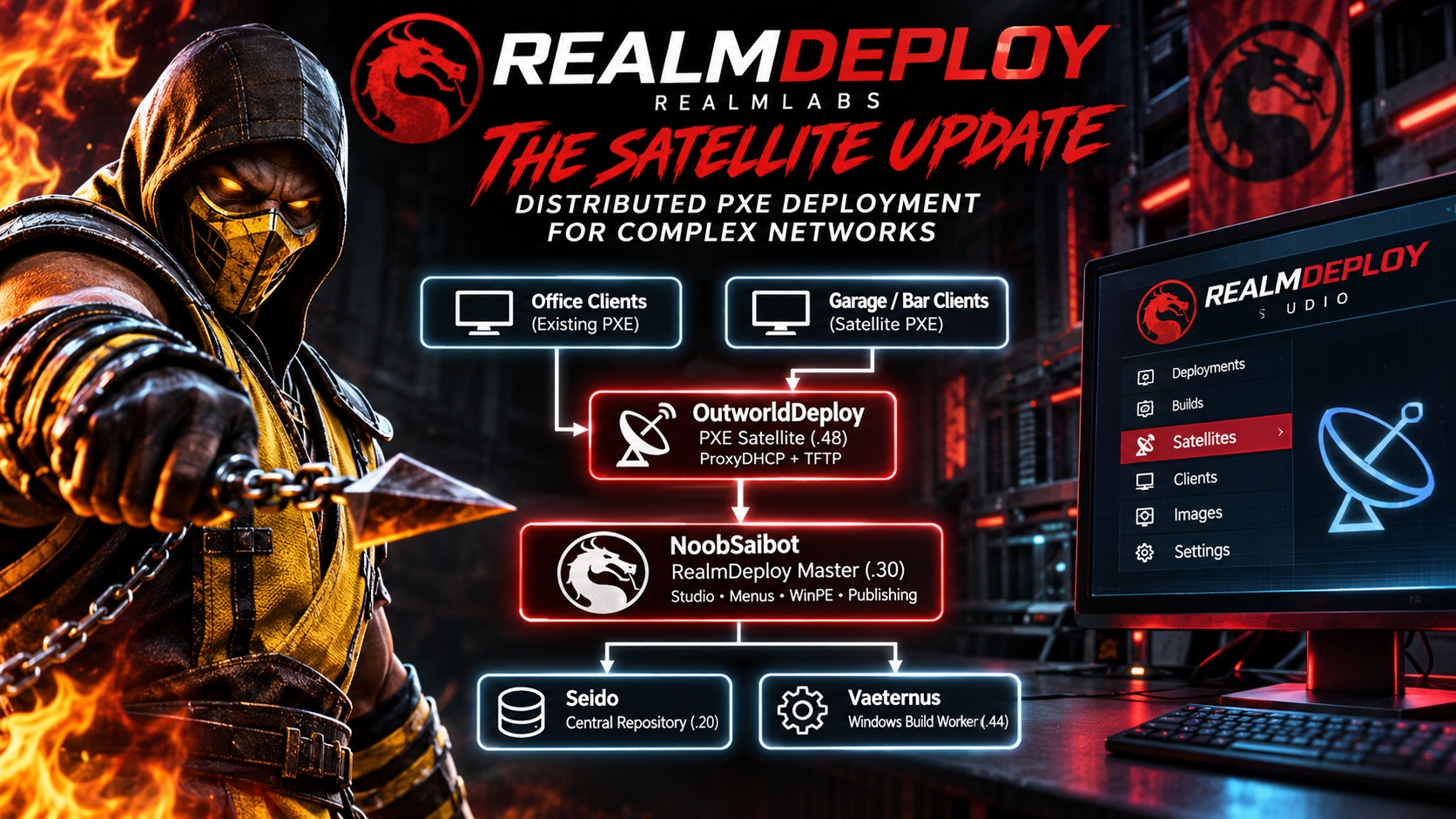
A Distributed Deployment Architecture
| System | Responsibility |
|---|---|
| NoobSaibot | Central Studio, menus, WinPE and publishing |
| OutworldDeploy | Local PXE discovery and bootloader delivery |
| Seido | Central repository |
| Vaeternus | Windows image preparation and build worker |
Once iPXE is running, the client connects directly to NoobSaibot. Menu navigation and deployment delivery remain centralised. Publishing new Windows images does not require duplicating them on the satellite.
Round One: Virtual BIOS Testing
A SeaBIOS VM on QuanChi previously required manual iPXE commands to reach RealmDeploy. With OutworldDeploy running, the VM was restarted and the RealmDeploy menu appeared automatically. No manual intervention or changes to the central deployment server were required.
Round Two: Physical UEFI Testing
Lamb-DJ, a physical Shuttle PC in the bar, had repeatedly failed automatic PXE discovery. After adding its MAC address to the satellite allowlist, I remotely restarted it and monitored the traffic.
- UEFI PXE discovery.
- IP allocation from the existing DHCP router.
- ProxyDHCP negotiation with OutworldDeploy.
- Download of realmlabs-snp.efi.
- Download of autoexec.ipxe.
- Successful iPXE execution.
- HTTP handover to NoobSaibot.
A final capture on NoobSaibot confirmed:
GET /menus/menu.ipxe HTTP/1.1
User-Agent: iPXE/2.0.0+ (g9261e)
Host: 192.168.68.30:8080

GET /realmlabs-1024.png HTTP/1.1
The physical client was executing the central menu and requesting its background artwork. Flawless Victory.
Validation Results
| Test | Result |
|---|---|
| Automatic virtual BIOS PXE | Passed |
| Automatic physical UEFI PXE | Passed |
| Satellite ProxyDHCP negotiation | Passed |
| TFTP bootloader delivery | Passed |
| Automatic HTTP handover | Passed |
| Central menu execution | Passed |
| Central background artwork request | Passed |
A complete Windows installation through the satellite remains to be validated. The automatic network boot problem has been overcome for both tested clients.
Why This Matters
Distributed PXE entry points could be useful where network equipment restricts DHCP traffic or where local boot services are preferable to a single central discovery point. Clients still need connectivity to the central deployment resources. Rather than maintaining multiple independent deployment servers, a lightweight satellite can provide local discovery whilst preserving a central source of deployment content.
The current implementation is manually configured. The featured artwork is conceptual: satellite management within RealmDeploy Studio is not implemented, and the diagram is illustrative rather than an authoritative network map.
Final Thoughts
Earlier in the evening, I was considering replacing existing network infrastructure simply to make PXE work reliably. Instead, a small Debian container solved the immediate problem and introduced an entirely new architectural capability.
No new hardware. No duplicated Windows images. No replacement router. Just a lightweight PXE satellite and a different approach to the problem.
One deployment platform. Multiple realms.
Konnect. Select. Deploy.
RealmDeploy is an independently developed RealmLabs home-lab project. Mortal Kombat-inspired naming and terminology are used as a personal creative theme.